

admin
Shopify Or WordPress For Dropshipping


Build Your First Challenge Funnel In WordPress
How to Create a Challenge Funnel with WordPress: A Step-by-Step Guide
Introduction: Why Use WordPress for Challenge Funnels?
If you’re exploring how to generate leads and boost sales with an online funnel, you’ve probably come across software like Clickfunnels or System.io. While these tools offer many features, they often come with hefty price tags and a learning curve that can overwhelm beginners.
In this guide, we’ll show you how to build an effective challenge funnel using WordPress—a low-cost, easy-to-use platform. With WordPress, you can create a Google-friendly funnel that drives engagement, generates leads, and earns money through affiliate offers. Best of all, you won’t need fancy software—just a simple WordPress site and some thoughtful content planning.
What Is a Challenge Funnel?
A challenge funnel offers participants a structured experience, typically delivered over several days, where they achieve a specific goal by following daily tasks. Each day’s content is designed to motivate participants and encourage them to progress further.
Examples of Challenge Funnels:
- 5-Day Website Setup Challenge
- 7-Day Weight Loss Challenge
- Save Money in 30 Days Challenge
The goal is to build a list of engaged leads and introduce affiliate offers as participants move through the challenge.
Setting Up WordPress for Your Challenge Funnel
Step 1: Convert Your Existing Website to WordPress
If your site is currently in HTML, follow these steps:
- Rename the index.html file to prevent conflicts (e.g.,
index-old.html). - Use InMotion Hosting’s WP Toolkit to install WordPress:
- Select your domain (e.g., AIProfitScoop.com).
- Leave the installation directory blank to install WordPress on the root domain.
- Keep the settings simple and override existing content if needed.
Step 2: Install a Theme for the Challenge Funnel
- Use NicePage or any free theme (e.g., Simple Blog Theme) to customize the design.
- Upload the theme via the Appearance > Themes section in WordPress.
- Import any necessary demo content to reflect your site’s branding.
Structuring Your Challenge Funnel in WordPress
Step 1: Create a Static Homepage
- Go to Settings > Reading and set your homepage to display a static page.
- This ensures that participants see only what you want them to: an opt-in form for the challenge.
- Each day’s content will be hidden until participants unlock it by progressing through the challenge.
Step 2: Add an Opt-In Form
- Use AWeber (free for up to 500 subscribers) or any other autoresponder to collect leads.
- Add a thank-you page for successful sign-ups and create a smooth flow:
- Example: “Thank you for signing up! Your Day 1 challenge will arrive shortly.”
Engaging Participants and Monetizing Your Funnel
1. Embed Affiliate Links into Daily Challenges
Each day’s content can contain affiliate links or product recommendations. For example:
- Day 1: Set up your hosting at GoHub (affiliate link).
- Day 2: Choose your niche with affiliate resources linked directly in the content.
This way, participants can act on recommendations and earn you commissions while progressing through the challenge.
2. Enable Comments for Social Proof
- Allow comments on each day’s post to foster interaction and engagement.
- Participants can share progress, ask questions, and motivate each other, creating a sense of community.
Benefits of Using a Challenge Funnel
1. Lead Generation
Challenge funnels attract new participants interested in solving a specific problem, helping you build a highly targeted email list.
2. Engagement and Motivation
Daily tasks and progress tracking keep participants engaged and on track toward their goal. Adding community interaction through comments enhances motivation.
3. Urgency Through Time-Bound Challenges
A 7-day challenge works well because it’s short enough to maintain excitement without overwhelming participants.
4. Affiliate Monetization
Strategically place affiliate offers throughout the challenge. For example:
- Day 3: Use this SEO tool (affiliate link) to optimize your site.
- Completion Page: Offer participants a related product as a reward for finishing the challenge.
5. Community Building
The challenge funnel fosters a sense of belonging through shared progress and goals.
Practical Tips for Building Your Challenge Funnel
Content Creation Tips from Jesse:
- Start with a clear title to define the goal of the challenge.
- Break down tasks into manageable steps to avoid overwhelming participants.
- Use keywords strategically to attract organic traffic from Google.
Bonus Tip from Marcus:
Incorporate results in advance—help participants achieve small wins quickly to build momentum. For example, if it’s a dating challenge, offer an actionable tip for day one: “Smile when you approach someone—it works!” Success motivates participants to stay committed.
Automating and Scaling Your Challenge Funnel
- Automate Follow-Ups:
Use your autoresponder (e.g., AWeber) to send reminders and keep participants on track. - Upsell Opportunities:
Introduce higher-tier products or services as participants complete the challenge. - Analytics and Reporting:
Track participant progress and challenge performance to improve future campaigns. - Scalability:
Your WordPress-based challenge can easily be scaled to reach larger audiences through social media ads or organic traffic.
Enhancing Your Funnel with Video and Personal Touch
- Embed videos directly into your WordPress pages to provide additional guidance.
- Upload MP4 files or use YouTube embed codes for seamless integration.
- Add a PayPal link for direct product sales or consultations.
The Importance of Human Connection
In an increasingly automated world, adding personal interaction makes a difference.
- Example: Marcus shares how he personally answered calls during his first product launch and achieved an 80% conversion rate simply by connecting with customers.
- Offering personalized support within your funnel will set you apart from automated competitors.
Promoting Your Challenge Funnel
- Use Facebook ads or organic posts to drive traffic to your challenge.
- Highlight achievable goals: “Complete this 7-day challenge and build your website!”
- Encourage participants to share the challenge with their network for additional reach.
Conclusion: Why WordPress is Ideal for Challenge Funnels
Building a challenge funnel with WordPress is simple, affordable, and effective. You don’t need complex funnel builders or expensive software to get started. With just a few key tools—WordPress, an autoresponder like AWeber, and affiliate links—you can create a powerful funnel that generates leads and earns commissions.
Start small and focus on delivering value through your content. As Marcus advises: “You don’t need a fancy tool until you have 1,000 paying customers. Start with WordPress and grow from there.”
If you’re ready to build your own challenge funnel, head over to WPcity.com for detailed resources, templates, and more in-depth guides.
Final Thoughts: Success Requires Action
While creating a challenge funnel can lead to exciting results, it’s essential to put in the work and stay consistent. Whether you’re building a 7-day AI challenge or a fitness funnel, your success depends on the value you provide and how well you engage with participants.
Happy funnel building!
Resources and Tools:
- WordPress
- AWeber for email marketing
- PayPal for payments
- NicePage for theme design
- WPcity.com for in-depth tutorials
Use Rank Math SEO to get powerful traffic
CUSTOM THEMES WITH NICEPAGE
Welcome to WP City! Today, we’re diving deep into how to use Rank Math SEO to get traffic to your WordPress site. If you’ve been wondering whether Rank Math is the right tool to help boost your website’s visibility on Google, you’re in the right place. In this guide, we’ll cover why Rank Math is a game-changer, how to set it up, and how you can use it to elevate your SEO game.
So, let’s get started!
What is Rank Math SEO, and Why Should You Use It?
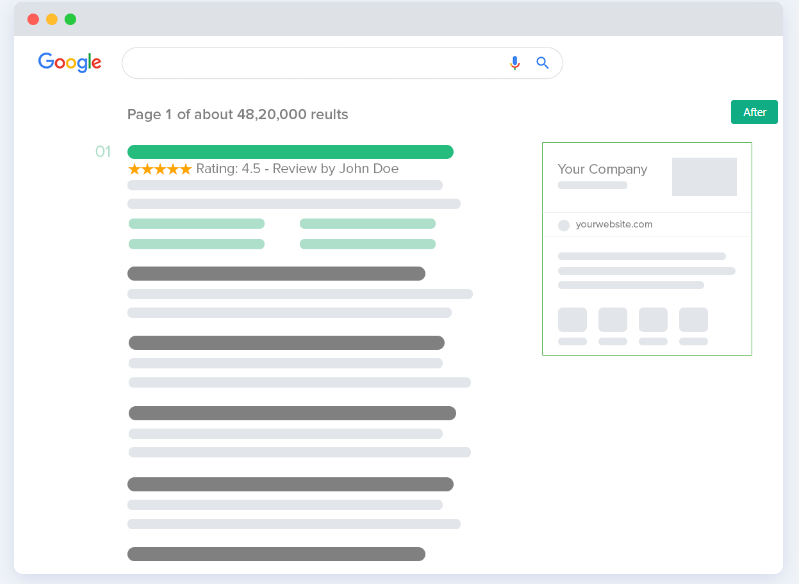
Rank Math SEO is a powerful WordPress plugin designed to simplify SEO for beginners and experts alike. If you’re looking to attract more visitors and improve your Google rankings, Rank Math is packed with features to help you get there. Think of it as your very own SEO assistant, providing insights and recommendations to make your site more appealing to search engines.
With AI-driven tools and a suite of SEO options, Rank Math gives you all you need to optimize your website, whether you’re new to WordPress or have been managing sites for years. Here’s how Rank Math SEO to get traffic can work for you.
Key Features of Rank Math SEO:
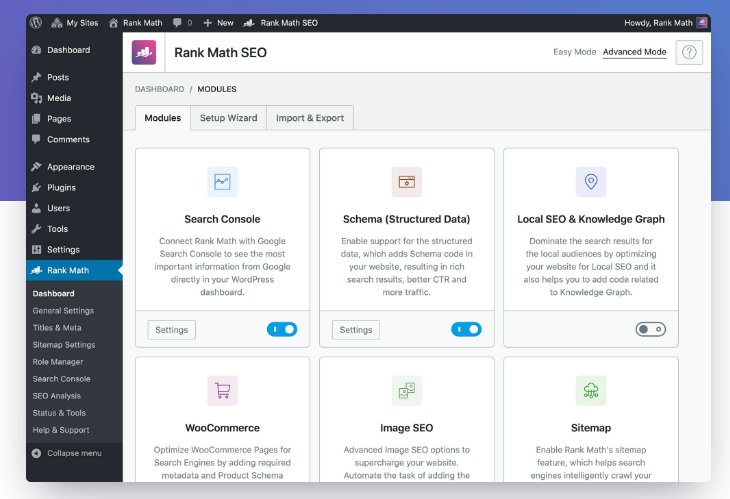
Rank Math’s comprehensive set of features makes it an essential tool for anyone looking to boost their SEO. Here are some highlights:
- SEO Analysis Suite: Run a full SEO analysis to identify and fix issues that could hurt your rankings.
- Intuitive Setup Wizard: The step-by-step wizard makes setting up your SEO settings a breeze, even for beginners.
- Schema Markup Integration: Add structured data to help search engines understand your content better, which can lead to enhanced search results.
- Google Search Console Integration: Connect your site to Google Search Console to track performance and spot SEO opportunities.
- Keyword Rank Tracking: Keep tabs on your target keywords to see if your SEO efforts are paying off.
- Content Insights: Get content improvement tips, such as keyword usage and readability suggestions.
- Social Media Integration: Optimize your posts for social sharing to increase engagement and reach.
- WooCommerce Support: For eCommerce sites, Rank Math includes options to optimize product pages.
- Speed Optimization: Identify issues affecting load speed, which is crucial for SEO.
- AI-Powered Analysis: Get actionable, AI-driven recommendations to make your content even better.
Setting Up Rank Math:
Here’s a quick guide to setting up Rank Math SEO to get traffic:
- Install and Activate: Log in to WordPress, go to Plugins > Add New, search for “Rank Math SEO,” then click Install and Activate.
- Run the Setup Wizard: Open Rank Math settings and launch the Setup Wizard. Select Advanced Setup to configure your website details, such as logo, social share image, and Google services.
- Configure SEO Settings:
- Sitemaps: Define which content should appear in your sitemap.
- SEO Tweaks: Adjust settings like opening external links in a new tab.
- Advanced Options: Set up roles, monitor 404 errors, and configure redirects.
- Schema Markup: Enable schema for posts, pages, and custom content types. You can also add missing alt tags for images.
- Connect to Google Search Console: Sign up or log in to Google Search Console, add your site, and verify it with Rank Math.
- Optimize Individual Posts and Pages: Use the Rank Math meta box on each post or page to refine the title, meta description, and keywords.
- Monitor and Analyze: Check the Rank Math dashboard for insights into keyword rankings and overall SEO performance.
- Regular Updates and Maintenance: Keep the plugin updated and review your SEO settings periodically to keep your site in top shape.
How Does Rank Math SEO Compare?
Jesse, our in-house WordPress expert, points out that while Rank Math helps automate SEO tasks, it’s still essential to choose the right keywords. Rank Math’s keyword suggestions and readability tips are useful tools, but aligning your content with what your audience is searching for is key.
Pros and Cons of Using Rank Math SEO
Pros:
- User-Friendly: The setup wizard is easy to navigate, even for beginners.
- AI-Powered Insights: Get tips on titles, keywords, and content improvements.
- Comprehensive Features: From SEO analysis to social sharing and schema markup, Rank Math covers a lot of ground.
Cons:
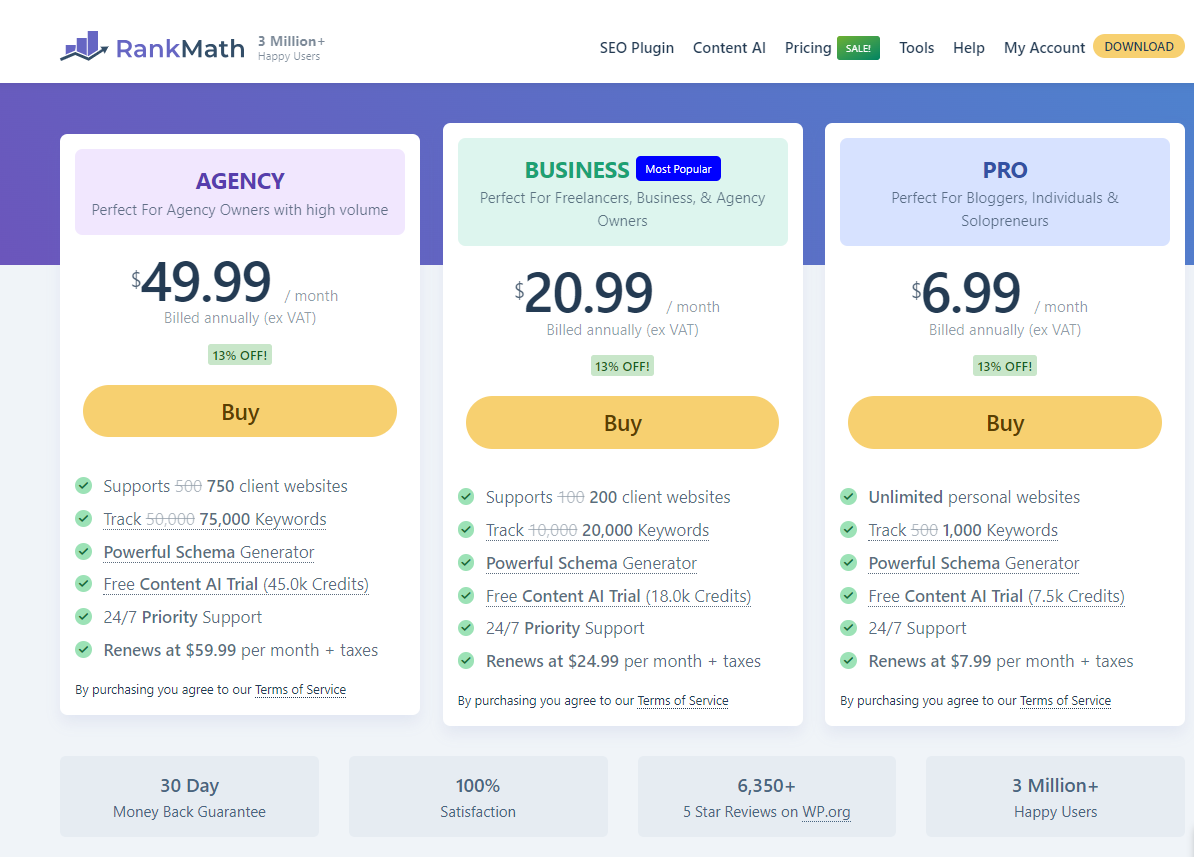
- Advanced Features Come at a Cost: Some features, like the AI content assistant, require a paid version.
- Overwhelming for Newbies: The number of settings might be intimidating for those new to SEO.
Is Rank Math SEO Right for You?
Whether you’re new to SEO or an experienced content creator, Rank Math SEO to get traffic can make a significant difference in your WordPress journey. The plugin offers robust tools that are valuable for improving your website’s visibility on Google, but remember that SEO results take time. Combining Rank Math’s insights with a strong content strategy is the real path to success.
If you’re managing an older site that needs an SEO boost or simply want to automate some SEO tasks, Rank Math is worth a try. Give it a few weeks, monitor your rankings, and decide if it’s making a difference.
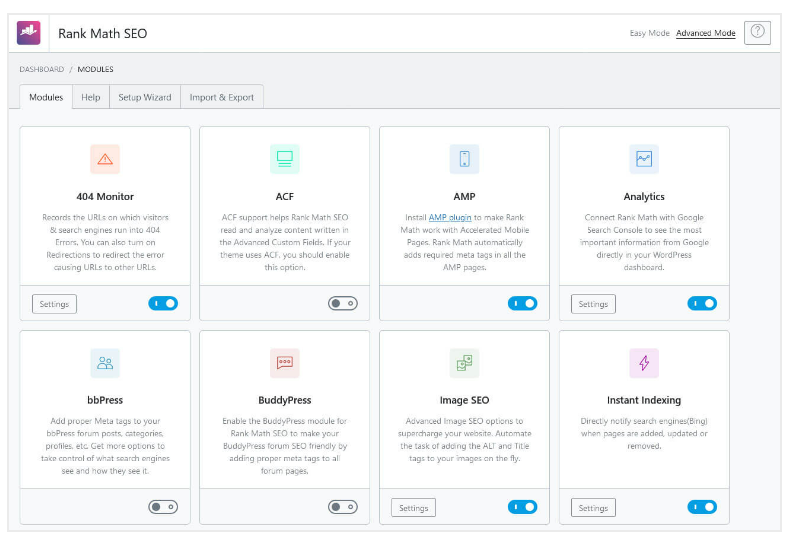
Rank Math offers much functionality at a reasonable price, especially if you want to automate some aspects of your SEO strategy. It’s particularly useful if you have an older website needing an SEO refresh or want to boost underperforming posts. Try it, monitor your rankings over a few weeks, and see if it makes a difference for your site.
For more insights, tools, and tips to maximize your WordPress experience, don’t forget to check out WP City and subscribe to our updates. We’re here to help you turn your website into a traffic generating machine!
Create A Challenge Funnel for WordPress
Welcome to WP City! Today, we’re diving into how you can create a Challenge Funnel using WordPress. You’ve probably heard of fancy funnel builders like ClickFunnels or Systeme.io that promise all in one solutions but come with a hefty price tag. However, you can build an effective challenge funnel using a basic WordPress setup, which is often easier, more Google-friendly, and more budget-friendly. Let’s walk through the steps to set up a challenge funnel on WordPress that can help you generate leads, build a mailing list, and start making money.
Why Choose WordPress for Your Challenge Funnel?
While many marketers turn to specialized funnel-building software, WordPress has many advantages:
- Google-Friendly: WordPress is known for being more SEO-friendly than many big software solutions, helping you rank better on search engines.
- Simplicity: WordPress allows you to build and customize your site without getting lost in complex tools. It’s perfect for both beginners and seasoned affiliate marketers.
What is a Challenge Funnel?

A challenge funnel is a structured campaign designed to attract and engage participants through a time bound challenge, like a 5-day website building challenge or a 7-day weight loss challenge. It’s a powerful way to build a mailing list while offering valuable content in a step-by-step format. Here’s how you can create your own using WordPress.
Challenge Funnel Features
- Lead Generation
- Attracts potential customers with targeted challenges
- Engagement
- Daily tasks and progress tracking
- Community interaction to maintain participant interest
- Time-Bound
- Set period challenges to create urgency and excitement
- Prize Incentive
- Rewards participants for completing the challenge
- Content Delivery
- Provides valuable tips, resources, and content
- Automated Follow-Up
- Sends emails and notifications to keep participants engaged
- Upselling Opportunity
- Introduces higher-tier products or services
- Analytics and Reporting
- Tracks progress and measures challenge success
- Community Building
- Encourages interaction and support among participants
- Scalability
- Easily adapted to different audience sizes and challenge types.
Setting Up WordPress for Your Challenge Funnel
Step 1: Convert Your Existing Website to WordPress
If your site is currently in HTML, follow these steps:
- Rename the index.html file to prevent conflicts (e.g., index-old.html).
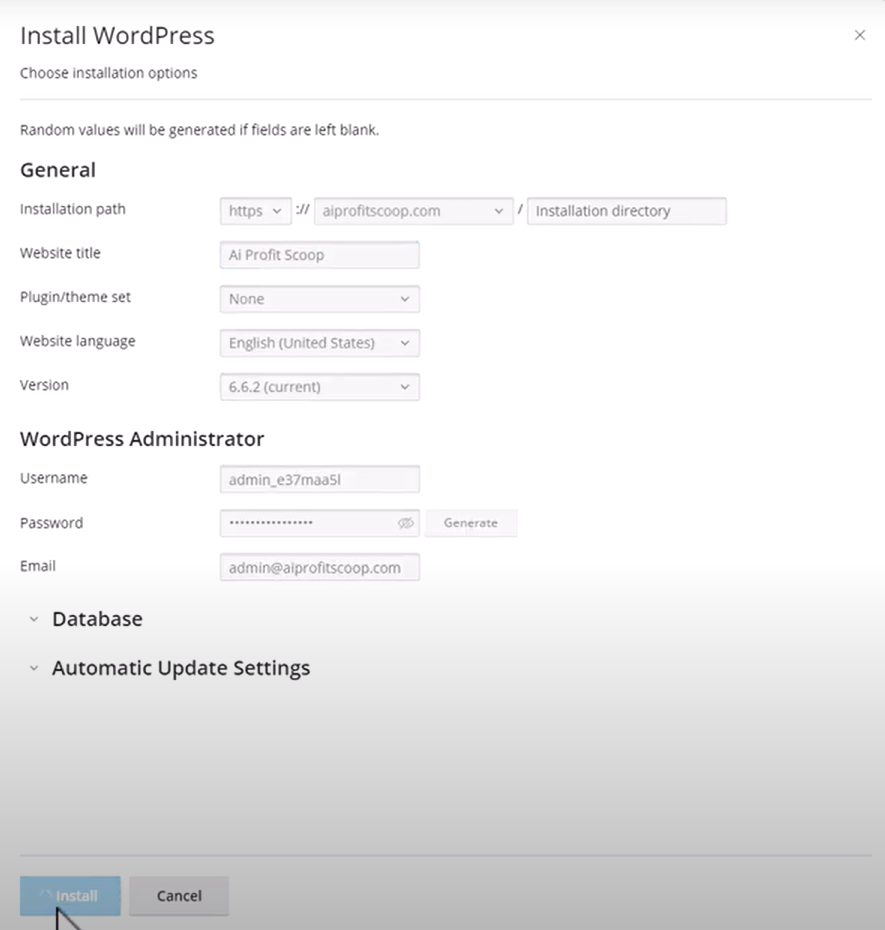
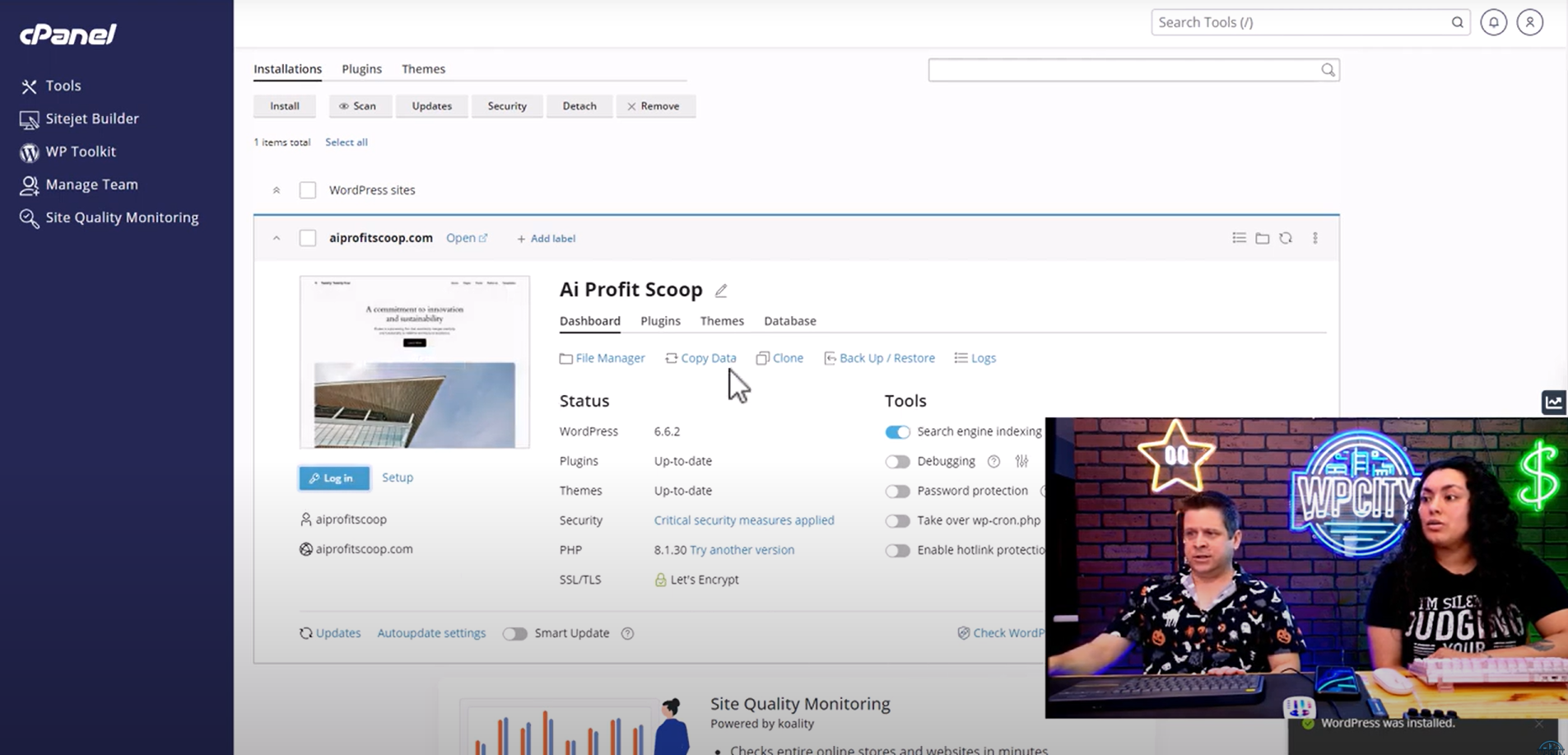
- Use InMotion Hosting’s WP Toolkit to install WordPress:
- Select your domain (e.g., AIProfitScoop.com).
- Leave the installation directory blank to install WordPress on the root domain.
- Keep the settings simple and override existing content if needed.
Step 2: Install a Theme for the Challenge Funnel
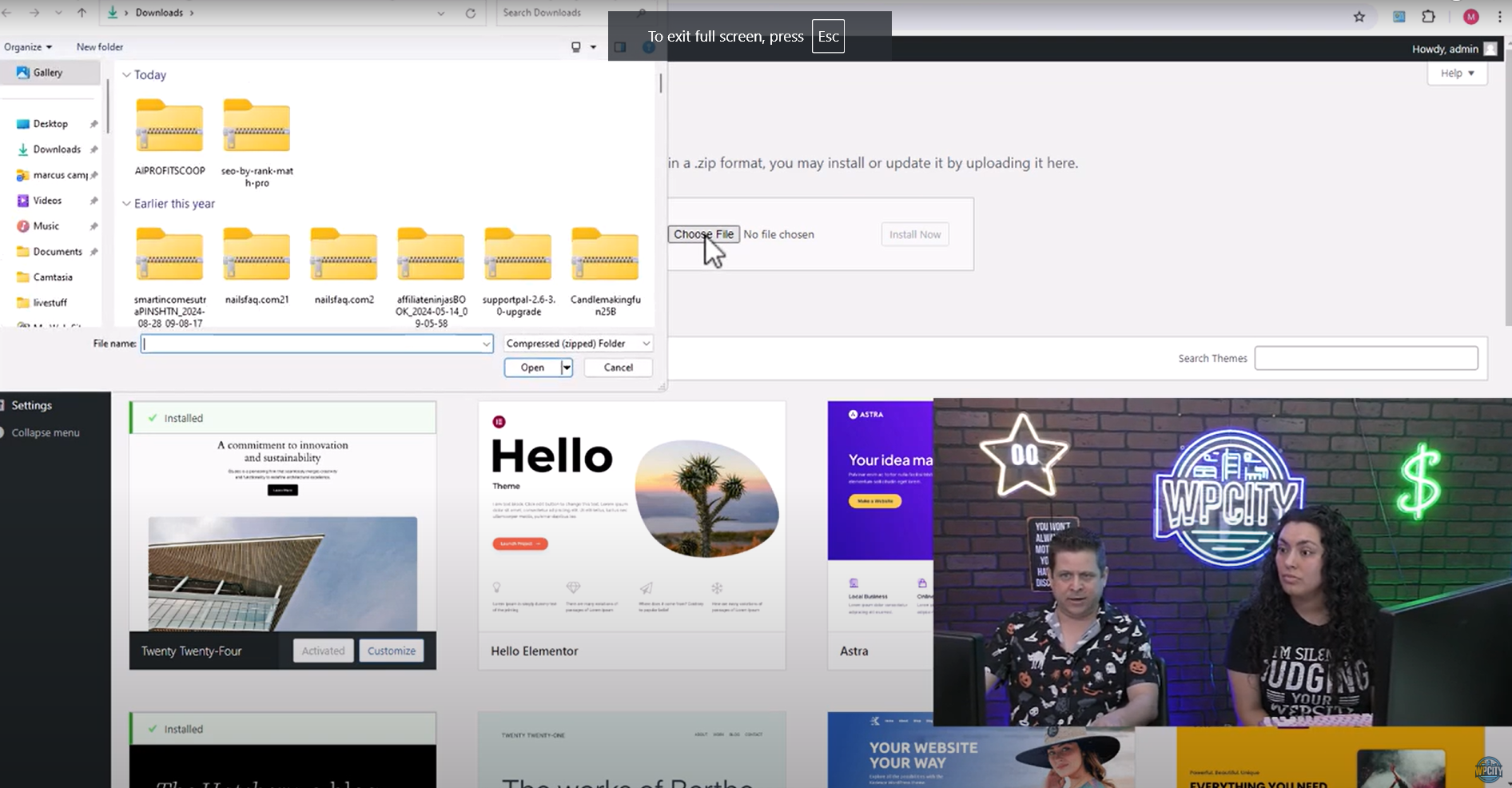
- Use NicePage or any free theme (e.g., Simple Blog Theme) to customize the design.
- Upload the theme via the Appearance > Themes section in WordPress.
- Import any necessary demo content to reflect your site’s branding.
Structuring Your Challenge Funnel in WordPress
Step 1: Create a Static Homepage
- Go to Settings > Reading and set your homepage to a static page.
- This ensures that participants see only what you want: an opt in form for the challenge.
- Each day’s content will be hidden until participants unlock it by progressing through the challenge.
Step 2: Add an Opt-In Form
- Use AWeber (free for up to 500 subscribers) or any other autoresponder to collect leads.
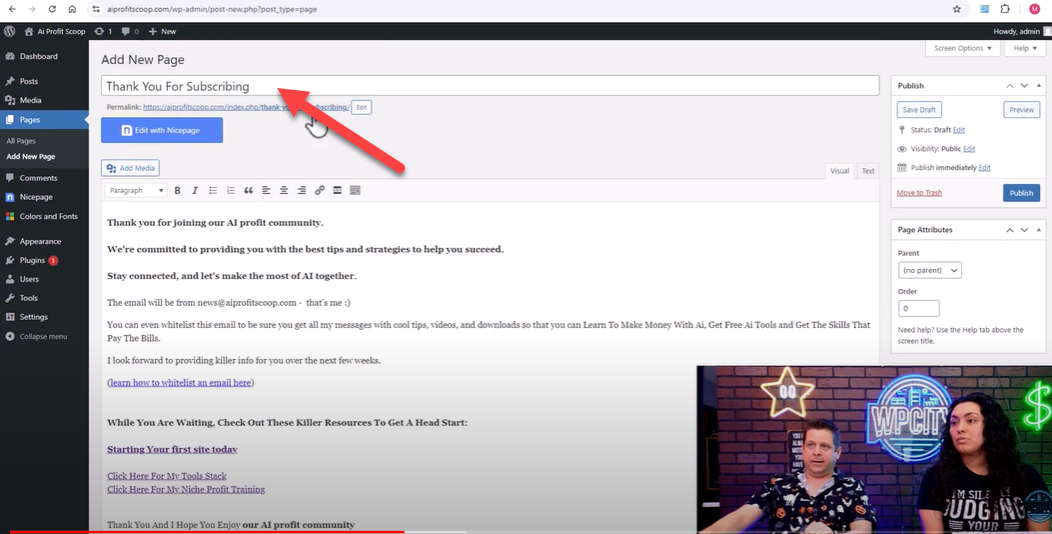
- Add a thank-you page for successful sign-ups and create a smooth flow:
- Example: “Thank you for signing up! Your Day 1 challenge will arrive shortly.”
Enhancing Your Funnel with Video and Personal Touch
- Embed videos directly into your WordPress pages to provide additional guidance.
- Upload MP4 files or use YouTube embed codes for seamless integration.
- Add a PayPal link for direct product sales or consultations.
The Importance of Human Connection
In an increasingly automated world, adding personal interaction makes a difference.
- Example: Marcus shares how he answered calls during his first product launch and achieved an 80% conversion rate simply by connecting with customers.
- Offering personalized support within your funnel will set you apart from automated competitors.
Promoting Your Challenge Funnel
- Use Facebook ads or organic posts to drive traffic to your challenge.
- Highlight achievable goals: “Complete this 7-day challenge and build your website!”
- Encourage participants to share the challenge with their network for additional reach.
Tips for Making the Most of Your Challenge Funnel:
- Use Affiliate Links Strategically: You can include affiliate links to relevant products during the challenge. For example, if Day 1 is about setting up a website, you could include a link to your recommended web hosting service.
- Leverage Social Proof: Use comments and feedback from challenge participants to build a sense of community. This can make your challenge more interactive and engaging.
- Keep It Simple: Focus on making each step clear and achievable. Don’t overwhelm your participants with too much information at once. Instead, break down each task so they can see progress every day.
Building a challenge funnel with WordPress is an accessible way to create an interactive experience for your audience. It’s a great way to provide value while generating leads and sales without investing in expensive tools. You can set up your challenge funnel by following the steps outlined here in no time.
If you want more tips, detailed videos, and resources on how to make the most of your WordPress site, visit us at WP City. We have everything you need to turn your website into a profit-generating machine. Happy challenge building, and we’ll see you in the next video!
A complete guide to outsource medical billing services

Outsourcing medical billing services might be a wise strategic choice for healthcare providers. It offers benefits like cost savings, improved accuracy, increased revenue, and more focus on patient care. By leveraging professional billing companies’ expertise and advanced By using technology, healthcare providers may guarantee regulatory compliance and optimize their operations.
The first step is to evaluate your current billing process and identify pain points. Research and select a reputable billing service provider with experience in your specialty, a solid reputation, up-to-date technology, and a transparent cost structure. A transition plan is essential to guarantee safe data transfer, system integration, and employee training.
Once the outsourcing process is underway, monitor the provider’s performance through established KPIs, maintain regular communication, and conduct periodic compliance audits. Address potential challenges like data security, communication barriers, and hidden costs by ensuring robust security protocols, clear communication channels, and a transparent understanding of the provider’s pricing model.
Ultimately, outsourcing medical billing services can lead to more efficient billing processes, reduced administrative burdens, and enhanced patient care, making it a worthwhile consideration for many healthcare providers.
Things to Remember: A Complete Guide to Outsource Medical Billing Services
- Understand Medical Billing:
- It involves filing insurance claims and then following up to get payment.
- Includes coding, claims submission, payment management, and handling denials.
- Benefits of Outsourcing:
- Cost Savings: Reduces overhead costs related to hiring and training in-house staff.
- Accuracy: Professional billing companies reduce errors.
- Revenue: Ensures timely submission and follow-up of claims, improving cash flow.
- Focus: Allows more time for patient care.
- Technology: Access to advanced billing software.
- Compliance: Maintains adherence to healthcare regulations and ensures data security.
- Steps to Outsource:
- Evaluate Needs: Identify pain points in your current billing process.
- Research Providers: Look for experience, reputation, technology, compliance knowledge, and cost structure.
- Transition Plan: Secure data transfer, integrate systems and train staff.
- Monitor Performance: Set KPIs, maintain communication, and conduct compliance audits.
- Potential Challenges:
- Data Security: Ensure encryption and security protocols.
- Communication: Establish clear channels and regular check-ins.
- Transition: Develop a detailed plan to avoid disruptions.
- Costs: Clarify all costs upfront and understand the pricing model.
Benefits: A complete guide to outsourcing medical billing services
There are several advantages to outsourcing medical billing services, and doing so can help healthcare providers become more profitable and efficient. Because fewer in-house billing staff need to be hired, trained, and maintained, there are significant cost savings. Professional billing companies, with their expertise and advanced technology, enhance accuracy and reduce errors in the billing process. This efficiency translates to increased revenue through timely submission and follow-up of claims, ensuring better cash flow. Additionally, outsourcing allows healthcare providers to focus more on patient care than administrative tasks. Access to cutting-edge billing software and technology is another advantage, providing better management of billing processes. Moreover, outsourcing ensures compliance with healthcare regulations and maintains the security of patient data, thereby mitigating risks associated with billing errors and regulatory breaches. Outsourcing medical billing services streamlines operations enhances revenue cycle management, and enables healthcare providers to deliver better patient care.
What to Look for in a Complete Guide to Outsourcing Medical Billing Services
Selecting the appropriate partner is crucial when outsourcing medical billing services to guarantee seamless operations and optimal advantages. Here are vital factors to consider:
- Experience and Expertise:
- Ensure the provider has significant experience in medical billing, particularly in your specialty.
- Look for a track record of success and satisfied clients.
- Technology and Software:
- The provider should use up-to-date, advanced billing software.
- Ensure compatibility with your existing Electronic Health Record (EHR) or Electronic Medical Record (EMR) systems.
- Compliance and Security:
- Verify the provider’s knowledge of healthcare regulations, including HIPAA.
- Ensure that robust data security procedures are implemented to protect patient data.
- Cost Structure:
- Understand the pricing model, whether it’s a percentage of collections, a flat fee, or another structure.
- Ensure transparency in all costs to avoid hidden fees.
- Performance Metrics:
- Establish Key Performance Indicators (KPIs) to measure the provider’s performance.
- Seek out suppliers who provide frequent analytics and reports on invoicing activity.
- Customer Support and Communication:
- Ensure the provider offers strong customer support and has clear communication channels.
- Regular updates and feedback should be part of their service.
- Transition and Implementation:
- The provider should have a detailed plan for transitioning your billing operations.
- Look for support during the implementation phase, including training for your staff.
- Reputation and References:
- Examine testimonials and reviews and get referrals from other healthcare providers.
- A good reputation is a strong indicator of reliability and quality service.
- Customization and Flexibility:
- Please ensure the supplier can customize their offerings to fit your unique requirements.
- Flexibility in service offerings can help address unique billing challenges.
- Integration Capabilities:
- The supplier needs to fit in easily with your existing procedures and systems.
- Integration helps maintain consistency and efficiency in billing operations.
Ease of Use
Ensuring ease of use is crucial when outsourcing medical billing services. To help your team adjust quickly, look for providers offering user-friendly interfaces and simplifying the onboarding process. In-depth instruction and continuous assistance are necessary to address any problems quickly. Seamless integration with your existing EHR/EMR systems can minimize disruptions and manual data entry. Automated processes for routine tasks like claim submissions and follow-ups save time and reduce errors. Clear communication channels and regular updates from the provider ensure smooth operations. Customizable features allow the service to cater to your specific needs, while transparent reporting provides easy-to-understand insights into your billing performance. Additionally, the provider should handle regulatory compliance, such as HIPAA, ensuring your practice stays compliant without extra effort. Finally, a good provider seeks and acts on client feedback to continuously improve their services.
Benefits and Drawbacks of Contracting Out Medical Billing Services
Pros:
- Cost Savings:
- Reduces overhead costs for hiring, training, and maintaining in-house billing staff.
- Eliminates expenses for billing software and technology updates.
- Increased Accuracy and Efficiency:
- Professional billing companies have expertise in handling complex billing codes and reducing errors.
- Efficient claim submission and follow-up processes lead to quicker reimbursements.
- Focus on Patient Care:
- Outsourcing administrative tasks allows healthcare providers to devote more time to patient care.
- Reduces the burden on in-house staff, leading to better overall service quality.
- Access to Advanced Technology:
- Billing companies use state-of-the-art software and technology for efficient billing management.
- Regular updates to technology and processes without additional cost to the provider.
- Improved Compliance:
- Ensures adherence to healthcare regulations such as HIPAA, reducing the risk of compliance issues.
- Regular audits and updates to stay compliant with changing regulations.
- Scalability:
- Easily adjust service levels to meet your practice’s needs without worrying about hiring more staff or making layoffs.
- Adapt to changes in practice size or patient volume seamlessly.
- Transparent Reporting and Analytics:
- Access comprehensive analytics and reports for improved financial management and decision-making.
- Real-time data helps track performance and identify areas for improvement.
Cons:
- Loss of Control:
- A perceived loss of control over the billing process may result from outsourcing.
- Dependency on an external provider for critical financial operations.
- Communication Issues:
- Potential for communication barriers between your practice and the billing provider.
- Misunderstandings or delays in communication can affect billing efficiency.
- Data Security Concerns:
- Sharing patient data with an outside supplier risks security breaches or other problems.
- It is essential to have strong security measures in place.
- Transition Challenges:
- The initial transition period can be disruptive and may temporarily affect billing operations.
- Training staff and integrating systems can take time and resources.
- Hidden Costs:
- Potential for hidden fees or additional costs not outlined in the initial agreement.
- All charges must be made clear upfront to prevent unforeseen fees.
- Vendor Reliability:
- Risk of choosing an unreliable or inexperienced provider.
- Importance of thorough research and vetting of potential providers.
Tables Outlining Prices, Features, and Descriptions for Outsourcing Medical Billing Services
Table 1: Price Structures
| Pricing Model | Description | Example Cost |
|---|---|---|
| Percentage of Collections | Billing company charges a percentage of the total amount collected from claims. | 5-10% of collections |
| Flat Fee | Fixed monthly or yearly fee regardless of the number of claims processed. | $1,000 – $5,000 per month |
| Per-Claim Fee | Fee based on the number of claims processed. | $3 – $10 per claim |
| Hybrid Model | Combination of percentage of collections and flat fee or per-claim fee. | 3% of collections + $2 per claim |
Table 2: Key Features
| Feature | Description |
|---|---|
| Claims Submission | Accurate and timely submission of insurance claims to ensure quick reimbursement. |
| Denial Management | Handling and resubmitting denied claims to maximize revenue recovery. |
| Reporting and Analytics | Detailed financial reports and analytics for tracking performance and identifying areas for improvement. |
| Compliance Management | Ensuring adherence to healthcare regulations such as HIPAA. |
| Patient Billing Services | Managing patient billing inquiries, sending statements, and handling payments. |
| Credentialing Services | Assistance with provider credentialing and re-credentialing processes. |
| Integration with EHR/EMR | Seamless integration with existing Electronic Health Record (EHR) or Electronic Medical Record (EMR) systems. |
| Customer Support | Ongoing support and communication channels to address issues and provide updates. |
Table 3: Service Descriptions
| Service | Description |
|---|---|
| Full-Service Billing | Comprehensive billing service covering claims submission, denial management, reporting, and patient billing. |
| Partial Billing Services | Selective services such as claims submission or denial management tailored to specific needs. |
| Revenue Cycle Management | End-to-end management of the revenue cycle from patient registration to final payment. |
| Consulting Services | Expert advice on improving billing processes and revenue cycle management. |
| Credentialing Services | Assistance with enrolling providers in insurance networks and maintaining credentials. |
Payment Processing Services Comparison Table
| Service Provider | Features | Pricing Structure | Security & Compliance | Integration Options | Customer Support |
|---|---|---|---|---|---|
| Service Provider A | – Claims submission and follow-up | Percentage of collections: 5-7% | HIPAA compliant, data encryption | EHR/EMR integration | 24/7 support |
| – Denial management | Per-claim fee: $4 | Regular compliance audits | API integration | Dedicated account manager | |
| – Reporting and analytics | |||||
| Service Provider B | – Full revenue cycle management | Flat fee: $2,000/month | HIPAA compliant, secure servers | EHR/EMR integration | Business hours support |
| – Credentialing services | Data encryption | Third-party software | Email and phone support | ||
| – Patient billing services | |||||
| Service Provider C | – Claims submission and resubmission | Hybrid model: 3% of collections + $3/claim | HIPAA compliant, regular training | EHR/EMR integration | 24/7 support |
| – Detailed financial reporting | Custom integration solutions | Dedicated account manager | |||
| – Patient support services | |||||
| Service Provider D | – Comprehensive billing and coding | Per-claim fee: $5 | HIPAA compliant, firewall protection | EHR/EMR integration | Business hours support |
| – Denial tracking and management | Regular security updates | Standard API integration | Email and phone support | ||
| – Monthly performance reports |
Thinkific vs kajabi the top ecommerce platform revealed

Hubspot competitors

When considering alternatives to HubSpot, several strong options cater to various business needs. Salesforce offers extensive customization, robust sales and marketing tools, and AI-powered insights, making it scalable for businesses of all sizes. Marketo excels in B2B marketing automation and integrates well with Adobe products. Pardot, another Salesforce product, focuses on B2B marketing with seamless CRM integration. Zoho CRM is a cost-effective solution for small to medium-sized businesses, offering multi-channel communication and sales automation.
ActiveCampaign provides affordable email marketing automation and advanced personalization, ideal for small businesses. Mailchimp is user-friendly with basic CRM functions, making it popular among startups. Pipedrive focuses on visual sales pipeline management, while Freshsales offers AI-based lead scoring and multi-channel communication.
Keap combines CRM, marketing automation, and e-commerce tools, emphasizing efficiency for small businesses. SharpSpring provides a cost-effective, all-in-one marketing platform with strong customer support. Each platform offers unique strengths, making them worthy alternatives to HubSpot based on specific business requirements.
Key Points to Remember: HubSpot Competitors
Salesforce
- Extensive customization and integration
- Robust sales and marketing tools
- Scalable for businesses of all sizes
Marketo (Adobe Experience Cloud)
- Advanced B2B marketing automation
- Deep integration with Adobe products
- Personalized customer engagement
Pardot (Salesforce)
- B2B marketing focus
- Seamless integration with Salesforce CRM
- Strong lead scoring and nurturing
Zoho CRM
- Cost-effective for small to medium-sized businesses
- Multi-channel communication tools
- Sales automation and AI-powered insights
ActiveCampaign
- Affordable email marketing automation
- Advanced segmentation and personalization
- Ideal for small businesses
Mailchimp
- User-friendly interface
- Basic CRM functionalities
- Popular among startups and small businesses
Pipedrive
- Intuitive and visual sales pipeline management
- Focus on improving sales efficiency
- Suitable for small to medium-sized businesses
Freshsales (Freshworks CRM)
- AI-based lead scoring
- Multi-channel communication
- User-friendly and affordable
Keap (formerly Infusionsoft)
- Combines CRM, marketing automation, and e-commerce tools
- Emphasizes automation and efficiency
- Integrated payment processing and invoicing
SharpSpring
- Cost-effective all-in-one marketing platform
- Marketing automation, CRM, and social media management
- Strong customer support and onboarding
Benefits of Hubspot Competitors
When evaluating alternatives to HubSpot, several competitors offer distinct benefits. Salesforce is highly customizable and scalable, suitable for businesses of all sizes. Marketo excels in B2B marketing automation and integrates well with Adobe products. Pardot focuses on B2B marketing with strong lead nurturing and seamless Salesforce integration. Zoho CRM is cost-effective for small to medium-sized businesses, offering multi-channel communication and AI insights.
ActiveCampaign provides affordable email marketing automation with advanced personalization, ideal for small businesses. Mailchimp is user-friendly with basic CRM functions, popular among startups. Pipedrive emphasizes visual sales pipeline management for improved efficiency. Freshsales offers AI-based lead scoring and multi-channel communication with an affordable, user-friendly interface.
Keap combines CRM, marketing automation, and e-commerce tools, focusing on efficiency for small businesses. SharpSpring is a cost-effective, all-in-one marketing platform with robust automation and strong customer support. Each competitor offers unique advantages, making them viable alternatives to HubSpot based on specific business needs.
Wp engine review

WP Engine, a renowned provider of premium managed WordPress hosting, is well-known for its exceptional performance, robust security, and excellent customer support. Catering to businesses of all sizes, it ensures fast load times with a custom-built EverCache system and CDN integration. Security features include daily backups, automated updates, malware scans, and free SSL certificates.
The platform is highly scalable, with plans ranging from tiny blogs to large enterprise sites, and offers 24/7 customer support from WordPress experts. Developer-friendly tools include staging environments, SSH and Git integration, and PHP 7.4+ and HTTP/2 support.
WP Engine guarantees 99.95% uptime with redundant data centers and failover mechanisms. Pricing starts at $30/month for small sites and scales up for more significant needs. While more expensive than standard hosting, the investment is justified by the high-quality performance, security, and support.
Ideal for businesses prioritizing these features, WP Engine offers a reliable and robust hosting solution, making it a worthy choice despite the higher cost.
Things to remember: WP engine
WP Engine Review: Key Points to Remember
- Performance and Speed:
- Utilizes custom-built EverCache system and CDN integration for fast load times.
- Regular updates and performance enhancements optimized for WordPress.
- Security:
- Features daily backups, one-click restore points, automated updates, malware scans, and free SSL certificates.
- Scalability:
- Handles traffic spikes efficiently with various plans, from tiny blogs to large enterprise sites.
- Customer Support:
- 24/7 chat, phone, and ticket support with access to WordPress experts.
- An extensive knowledge base and online resources are available.
- Developer-Friendly:
- Staging environments for testing, SSH and Git integration, support for PHP 7.4+ and HTTP/2.
- Uptime and Reliability:
- 99.95% uptime guarantee with redundant data centers and failover mechanisms.
- Pricing:
- Higher cost reflecting premium features and services.
- Plans start at $30/month, scaling up for more significant sites with higher traffic.
- Ideal For:
- Businesses and websites prioritize performance, security, and support.
- Developers and agencies need advanced tools and environments.
- Sites expecting high traffic volumes require scalable solutions.
- Pros:
- Exceptional speed and performance.
- Strong security features.
- Excellent customer support.
- Developer-friendly with advanced tools.
- Cons:
- Higher cost compared to standard hosting providers.
- Limits on monthly visits and storage with potential overage charges.
Benefits of WP Engine
WP Engine offers numerous benefits, making it a top choice for managed WordPress hosting. Its exceptional performance is driven by a custom-built EverCache system and CDN integration, ensuring fast load times. Robust security features include daily backups, automated updates, malware scans, and free SSL certificates to protect your site. WP Engine’s scalability efficiently handles traffic spikes, catering to various website sizes with flexible plans.
WordPress experts provide 24/7 customer support via chat, phone, and tickets. Developers benefit from tools like staging environments, SSH and Git integration, and support for PHP 7.4+ and HTTP/2. WP Engine guarantees 99.95% uptime with redundant data centers and failover mechanisms. Its user-friendly interface, SEO optimization, and comprehensive analytics simplify site management and performance monitoring. Although it costs more, the premium features, security, and support make the purchase worthwhile.
Reviews
WP Engine is a high-end managed WordPress hosting company renowned for its outstanding customer service, robust security features, and performance. It is a flexible and dependable option for WordPress users, serving a broad spectrum of enterprises, from tiny blogs to massive enterprise websites.
Key Benefits
Exceptional Performance: WP Engine leverages a custom-built EverCache system and integrates it with a content delivery network (CDN) to guarantee quick load times and top efficiency. The platform is regularly updated and optimized specifically for WordPress, providing a seamless user experience.
Robust Security: Security is WP Engine’s top priority. It offers daily backups, one-click restore points, automated security updates, malware scans, and free SSL certificates, ensuring that websites remain secure and protected from threats.
Scalability: WP Engine can efficiently handle traffic spikes, making it suitable for websites experiencing varying traffic levels. The hosting plans are scalable, catering to small personal blogs and high-traffic enterprise sites.
Expert Support: The platform provides 24/7 customer support via chat, phone, and tickets, giving users access to WordPress experts. Additionally, WP Engine has an extensive knowledge base and online resources to assist with troubleshooting and optimization.
Developer-Friendly Environment: WP Engine is ideal for developers. It offers staging environments for testing changes, SSH and Git integration, and support for PHP 7.4+ and HTTP/2. These tools and features make development and deployment processes more efficient and streamlined.
High Uptime and Reliability: With a guaranteed 99.95% uptime, WP Engine ensures that websites remain accessible. The platform uses redundant data centers and failover mechanisms to maintain high availability and reliability.
Pricing
WP Engine’s pricing reflects its premium features and services, with plans designed to meet various needs:
- Startup Plan: Starting at $30/month, suitable for small websites and blogs.
- Professional Plan: Around $60/month, ideal for growing businesses.
- Growth Plan: Approximately $115/month for more significant sites and online stores.
- Scale Plan: Around $290/month for large companies and high-traffic sites.
- Custom Plans: These are available for enterprises with specific requirements.
Pros and Cons
Pros:
- Exceptional speed and performance.
- Strong security features.
- Excellent customer support.
- Developer-friendly tools and environments.
- High uptime and reliability.
Cons:
- Higher cost compared to standard hosting providers.
- Limits on monthly visits and storage, with potential overage charges if exceeded.
Why use the WP engine?
Using WP Engine offers several compelling advantages, especially for those prioritizing performance, security, and support in their WordPress hosting. Here are key reasons to choose WP Engine:
Exceptional Performance
WP Engine’s infrastructure is optimized specifically for WordPress, leveraging a custom-built EverCache system and CDN integration. This ensures fast load times, even during traffic spikes, and provides a smooth user experience.
Robust Security
WP Engine provides comprehensive security features, including daily backups, one-click restore points, automated security updates, malware scans, and free SSL certificates. These measures help protect your site from threats and ensure data integrity.
Scalability
Whether you run a small blog or a high-traffic enterprise site, WP Engine can handle your needs. Its scalable plans and efficient handling of traffic spikes make it suitable for websites experiencing growth or fluctuating traffic levels.
Expert Support
With 24/7 customer support via chat, phone, and tickets, users can access WordPress experts whenever needed. The platform also provides a vast knowledge base and online tools to help with problems or inquiries.
Developer-Friendly ToolsWP Engine offers developers an array of tools and features., including staging environments for testing changes, SSH and Git integration, and support for PHP 7.4+ and HTTP/2. These capabilities streamline the development and deployment processes.
High Uptime and Reliability
WP Engine guarantees 99.95% uptime, ensuring that your site remains accessible to users. The platform employs redundant data centers and failover mechanisms to maintain high availability and reliability.
SEO Optimization
The hosting environment is built using SEO best practices, helping to improve search engine rankings and drive organic traffic to your site.
Ease of Use
Despite its advanced features, WP Engine offers a user-friendly interface and tools that simplify site management, enabling even people with little technical knowledge to access it.
Regular Updates and Enhancements
WP Engine upgrades and enhances its platform frequently to guarantee the security and functionality of your website, ensuring you benefit from the latest performance improvements and security measures.
Comprehensive Analytics
WP Engine provides detailed analytics and performance metrics, allowing you to monitor and optimize your site’s performance effectively.
Flexible Pricing Plans
With various plans to suit different needs and budgets, WP Engine allows you to choose the most appropriate option for your site, from small personal blogs to large enterprise websites.
What to Look for in a Wp engine review
When evaluating a WP Engine review, it’s essential to consider several key aspects to determine whether this hosting provider meets your needs. Here are the critical factors to look for:
Performance and Speed
- Caching Technology: Look for information on WP Engine’s caching mechanisms, such as the EverCache system.
- CDN Integration: Check if a CDN is included and how it affects site speed.
- Load Times: Reviews should mention real-world speed tests or performance benchmarks.
Security Features
- Backup and Restore: Daily backups and one-click restore points are crucial for data safety.
- Security Updates: Automated security updates and patches should be highlighted.
- Malware Protection: Look for malware scanning and threat detection capabilities.
- SSL Certificates: Ensure the review mentions free SSL certificates for secure connections.
Scalability
- Traffic Handling: Reviews should discuss how WP Engine handles traffic spikes and scalability.
- Plan Options: This section provides information on the range of plans available and their suitability for different website sizes and traffic levels.
Customer Support
- Availability: 24/7 customer support is essential; check if reviews mention response times.
- Expertise: Look for feedback on the quality and helpfulness of the support team.
- Resources: Reviews should mention the availability of a knowledge base and other online resources.
Developer Tools
- Staging Environments: The ability to create staging sites for testing changes should be discussed.
- Development Integrations: Look for mentions of SSH and Git integration, as well as support for PHP 7.4+ and HTTP/2.
- Customization Options: Reviews should cover how easy it is to customize and deploy sites.
Uptime and Reliability
- Uptime Guarantee: Reviews should note WP Engine’s uptime guarantee (typically 99.95%).
- Data Center Redundancy: Information on data center redundancy and failover mechanisms.
Pricing and Value
- Cost: Reviews should detail the pricing plans and what is included.
- Value for Money: Look for assessments of whether the features and performance justify the cost.
- Overage Charges: Check if there are mentions of limits on visits and storage and any potential overage charges.
SEO and Analytics
- SEO Features: Reviews should mention any SEO optimizations provided by WP Engine.
- Analytics Tools: Check for the availability of detailed analytics and performance metrics.
Pros and Cons
- Advantages: Summarize the key benefits of using WP Engine, such as speed, security, and support.
- Disadvantages: Highlight any potential drawbacks, such as higher costs or limits on usage.
Real User Experiences
- Testimonials: Look for reviews that include real user experiences and testimonials.
- Case Studies: Reviews with case studies or specific examples of how WP Engine has performed for other users can be very insightful.
Ease of Use in WP Engine
Several factors come into play when assessing the ease of use of WP Engine. Here’s what to look for:
User Interface
- Dashboard Design: WP Engine’s dashboard is intuitive and user-friendly, designed to simplify navigation and management even for those with limited technical expertise.
- Account Management: The interface allows users to easily manage billing, add or remove websites, and access various features without hassle.
Setup Process
- Quick Start: WP Engine offers a streamlined setup process, enabling users to get their WordPress site up and running quickly.
- Guided Setup: New users benefit from instructions and wizards that simplify the initial configuration.
Site Management
- One-Click Staging: WP Engine provides one-click staging environments, making it easy to test changes before applying them to the live site. Site administrators and developers will find this especially helpful.
- Backup and Restore: Daily backups and one-click restore options make recovering from errors or data loss simple.
- Automatic Updates: The platform handles automatic WordPress core updates, reducing the burden on users to keep their site up-to-date manually.
Tools and Features
- User-Friendly Tools: Features like the built-in content delivery network (CDN) and caching are managed through the dashboard, requiring minimal manual configuration.
- Developer Tools: Advanced tools, such as SSH and Git integration, are available but do not overwhelm non-technical users, who can use these features as needed.
Documentation and Resources
- Comprehensive Knowledge Base: WP Engine provides extensive documentation and a knowledge base that covers everyday tasks, troubleshooting, and advanced configurations.
- Support Resources: Users can access various support resources, including tutorials, FAQs, and forums.
Customer Support
- 24/7 Support: Having round-the-clock access to customer support means users can get help whenever needed, enhancing overall usability.
- Expert Assistance: Support staff are WordPress experts who can provide detailed and knowledgeable assistance for simple and complex issues.
Performance and Monitoring
- Built-In Analytics: WP Engine includes built-in analytics and performance monitoring tools, allowing users to track site performance and make informed decisions without needing third-party services.
Customization and Flexibility
- Scalable Plans: The range of plans and the ability to upgrade or downgrade easily mean users can tailor their service to their specific needs without a complicated process.
Pros and Cons of WP Engine
Pros
-
- Exceptional Performance:
- Custom-built EverCache system
- CDN integration for fast load times
- Robust Security:
- Daily backups
- Automated updates
- Malware scans
- Free SSL certificates
- Scalability:
- Efficiently handles traffic spikes.
- Range of plans for different website sizes
- Expert Support:
- 24/7 customer support
- Access to WordPress experts
- Extensive knowledge base and resources
- Developer-Friendly:
- Staging environments
- SSH and Git integration
- Supports PHP 7.4+ and HTTP/2
- High Uptime and Reliability:
- 99.95% uptime guarantee
- Redundant data centers and failover mechanisms
- Ease of Use:
- User-friendly interface
- Automatic WordPress core updates
- SEO Optimization:
- Built-in SEO best practices
- Comprehensive Analytics:
- Detailed analytics and performance metrics
- Flexible Pricing Plans:
- Plans that differ to meet different demands and finances
- Exceptional Performance:
Cons
-
- Higher Cost:
- More expensive than standard hosting providers
- Limits on Usage:
- Monthly visit and storage limits
- Potential overage charges
- Limited Built-In Visual Customization:
- Reliance on third-party plugins for extensive customization
- Complexity for Beginners:
- The learning curve for new users
- No Email Hosting:
- It requires a separate email hosting provider. Plugin compatibility: WP Engine maintains compatibility with a wide range of WordPress plugins, enabling users to customize their sites. There are pros and Cons to WP Engine.
- Higher Cost:
WP Engine Pricing, Features, and Descriptions
Themify builder vs elementor pro

Themify Builder and Elementor Pro are influential WordPress page builders with distinct features. Themify Builder offers a user-friendly drag-and-drop interface, front-end and back-end editing, pre-designed layouts, and various addons for added functionality like sliders and animations. It’s also designed to be responsive, ensuring websites look great on all devices.
Elementor Pro is more advanced, featuring a highly intuitive drag-and-drop editor and extensive customization options. It includes a Theme Builder for designing all parts of a website, a WooCommerce Builder for e-commerce pages, and a Popup Builder for interactive popups. With support for dynamic content and a vast library of templates, Elementor Pro integrates seamlessly with various marketing tools, making it ideal for users needing advanced customization and integration capabilities.
Things to Remember: Themify Builder vs Elementor Pro
Themify Builder:
- User-Friendly: Simple drag-and-drop interface.
- Editing Flexibility: Supports both front-end and back-end editing.
- Pre-Designed Layouts: Offers various templates and sections.
- Addons: Additional features like sliders and animations are included.
- Responsive Design: Ensures websites look good on all devices.
- Cost: Generally more budget-friendly.
Elementor Pro:
- Advanced Customization: Intuitive drag-and-drop editor with extensive options.
- Theme Builder: Allows complete design control over headers, footers, and other site parts.
- WooCommerce Builder: Tailored for e-commerce site customization.
- Popup Builder: Enables the creation of interactive popups.
- Dynamic Content: Ideal for sites displaying variable data.
- Templates and Blocks: Large library for quick, professional designs.
- Integration: Seamless with various marketing tools and services.
- Cost: Higher price point for premium features.
Benefits of Themify Builder vs. Elementor Pro
Themify Builder offers an intuitive drag-and-drop interface, making it accessible for beginners. It supports both front-end and back-end editing, providing flexibility in Design. The builder includes pre-designed layouts and addons like sliders and animations, which speed up the design process. Its cost-effectiveness makes it an excellent option for those on a budget. Additionally, Themify ensures that websites are responsive and look good on all devices.
Elementor Pro, on the other hand, provides advanced customization options with its intuitive editor. The Theme Builder allows for designing every part of a website without coding, while the WooCommerce Builder enhances e-commerce functionality. Elementor Pro also includes a Popup Builder for interactive popups, supports dynamic content and offers a vast library of templates. Seamless integration with marketing tools and advanced design features like motion effects and custom CSS make it ideal for professional and comprehensive site-building.
In summary, Themify Builder is perfect for users seeking a straightforward, budget-friendly solution, while Elementor Pro is suited for those needing advanced customization and professional design capabilities.
Reviews
Themify Builder
Ease of Use: Themify Builder’s user-friendly drag-and-drop interface Makes it suitable for novice and non-technical users.
Editing Flexibility: Users can choose between front-end and back-end editing, offering flexibility in how they design their sites.
Pre-Designed Layouts: The builder comes with various pre-designed layouts and sections, speeding up the website creation process.
Cost-Effective: Themify Builder is generally more budget-friendly, making it an excellent option for those with financial constraints.
AddonsAddons: The site includes various addons, such as sliders and animations, to enhance its functionality and aesthetics.
Responsive Design ensures that websites work and appear well across various platforms, including smartphones and desktop computers.
Elementor Pro
Advanced Customization: Elementor Pro offers extensive customization options with its highly intuitive drag-and-drop editor.
Theme Builder: Using the theme builder, users may create any aspect of their website, including headers, footers, and archive pages, without knowing any code.
WooCommerce Builder: Provides specific tools for creating customized e-commerce pages enhancing online store functionality.
Popup Builder: Features a Popup Builder for creating interactive popups, boosting user engagement and marketing efforts.
Dynamic Content Support: Ideal for websites that display variable data, offering a more personalized user experience.
Extensive Template Library: The extensive library of templates and blocks allows for quick and professional page designs.
Integration with Marketing Tools: Seamlessly integrates with various marketing tools and services, enhancing overall site functionality.
Professional Design Features: This package includes advanced design features like motion effects, custom fonts, and custom CSS, enabling the creation of highly polished and professional websites.
What to Look for in Themify Builder vs Elementor Pro
Ease of Use:
- Themify Builder: Seek a drag-and-drop interface that is simple to use and intuitive, particularly for non-technical or novice users.
- Elementor Pro: Ensure the editor is user-friendly with an easy learning curve, even with its advanced features.
Editing Flexibility:
- Themify Builder: Check for the ability to switch between front-end and back-end editing to suit your workflow preferences.
- Elementor Pro: Look for seamless editing capabilities, particularly with its front-end editor for real-time design updates.
Customization Options:
- Themify Builder: Verify the availability of pre-designed layouts and sections to speed up your design process.
- Elementor Pro: Ensure there are extensive customization options, including a Theme Builder for complete site design control.
Cost:
- Themify Builder: Consider the overall affordability, ensuring it fits your budget while providing necessary features.
- Elementor Pro: Evaluate the pricing relative to the advanced features offered, ensuring it delivers value for the investment.
AddonsAddons and Integrations:
- Themify Builder: Look for addons that enhance functionality, such as sliders and animations.
- Elementor Pro: Check for a wide range of integrations with marketing tools and services and advanced features like motion effects and custom CSS.
Responsive Design:
- Themify Builder: Ensure the builder creates responsive designs that look good on all devices.
- Elementor Pro: Make sure it offers a consistent user experience on PCs, tablets, and smartphones and supports responsive design elements.
Template Library:
- Themify Builder: Check the variety and quality of pre-designed templates and sections to help jumpstart your projects.
- Elementor Pro: Look for a comprehensive library of templates and blocks that enable quick and professional page designs.
Advanced Features:
- Themify Builder: Consider any unique features or addons that may provide additional value, such as built-in SEO tools or custom post types.
- Elementor Pro: Ensure it includes advanced design features like dynamic content support, WooCommerce Builder, and Popup Builder for enhanced site functionality.
Key Features: Themify Builder vs Elementor Pro
Themify Builder:
- Drag-and-Drop Interface: Easy-to-use interface that allows users to build pages by dragging and dropping elements.
- Front-End and Back-End Editing: Offers both front-end and back-end editing, providing flexibility in Design.
- Pre-Designed Layouts and Sections: Various templates and pre-designed sections to speed up the design process.
- AddonsAddons: Includes various addons for enhanced functionality, such as sliders, animations, and more.
- Responsive Design: Ensures websites look good and function well on all devices.
- Affordable Pricing: Generally more budget-friendly compared to Elementor Pro.
- Styling Options: Offers various styling options to customize the appearance of elements.
- SEO-Friendly: Built-in SEO options to help improve search engine rankings.
Elementor Pro:
- Drag-and-Drop Editor: A highly intuitive editor that allows users to create complex layouts easily.
- Theme Builder: This tool enables the Design of every part of a website, including headers, footers, and archive pages, without coding.
- WooCommerce Builder: Provides tools for creating customized e-commerce pages, enhancing the functionality of online stores.
- Popup Builder: Allows users to create interactive popups for better user engagement and marketing.
- Dynamic Content: Supports dynamic content, making it ideal for websites displaying variable data.
- Extensive Template Library: Offers a vast library of templates and blocks for quick, professional page designs.
- Advanced Design Features: Includes motion effects, custom fonts, custom CSS, and more for polished, professional websites.
- Integration with Marketing Tools: Seamlessly integrates with various marketing tools and services, enhancing overall site functionality.
- Responsive Design: Ensures a consistent user experience across desktops, tablets, and smartphones.
- Regular Updates: These are frequent updates introducing fresh features and improvements to keep the builder current.
Ease of Use
Regarding ease of use, Themify Builder and Elementor Pro cater to different user needs but offer intuitive interfaces that simplify website building. Themify Builder is known for its straightforward drag-and-drop interface, making it accessible even to beginners and non-technical users. Customers can customize their websites to fit their workflow by offering front-end and back-end editing tools. The variety of pre-designed layouts and sections further eases the design process, enabling users to create visually appealing pages without much hassle.
On the other hand, Elementor Pro also boasts an exceptionally user-friendly drag-and-drop editor, but it shines with its advanced customization capabilities. Despite its more extensive feature set, Elementor Pro maintains an intuitive interface that facilitates easy navigation and use, even for those new to page builders. The live front-end editing feature allows users to see real-time changes as they adjust, providing a seamless and efficient design experience. Additionally, the extensive library of templates and blocks in Elementor Pro allows for quick setup and Design, making it easy to create professional-looking pages with minimal effort.
In summary, while Themify Builder is excellent for users seeking a straightforward and budget-friendly option, The user-friendly interface of Elementor Pro strikes a mix between simplicity of use and extensive customization possibilities.
Pros and Cons: Themify Builder vs Elementor Pro
Themify Builder:
Pros:
- User-Friendly Interface: The intuitive drag-and-drop interface is easy for beginners to use.
- Flexibility: Supports both front-end and back-end editing, offering versatility in design workflows.
- Pre-Designed Layouts: Comes with various templates and sections, speeding up the design process.
- Cost-Effective: Generally more affordable compared to Elementor Pro.
- AddonsAddons: Offers various addons for enhanced functionality, such as sliders and animations.
- Responsive Design: Ensures that websites look good on all devices.
- SEO-Friendly: Includes built-in SEO options to help improve search engine rankings.
Cons:
- Limited Advanced Features: excludes some of Elementor Pro’s most sophisticated Design and customization features.
- Integration Options: Fewer integrations with third-party tools and services compared to Elementor Pro.
- Less Dynamic Content Support: More robust in handling dynamic content than Elementor Pro.
- Updates and Support: There may not be as frequent or comprehensive support as Elementor Pro.
Elementor Pro:
Pros:
- Advanced Customization: Offers extensive customization options with a highly intuitive drag-and-drop editor.
- Theme Builder: Without knowing how to code, users may create any aspect of their website, including the headers, footers, and archive pages.
- WooCommerce Builder: Provides specific tools for creating customized e-commerce pages.
- Popup Builder: Features a Popup Builder for creating interactive popups, enhancing user engagement and marketing.
- Dynamic Content Support: Ideal for websites that display variable data, offering a more personalized user experience.
- Extensive Template Library: A vast library of templates and blocks for quick, professional page designs.
- Integration with Marketing Tools: Seamless integration with various marketing tools and services.
- Professional Design Features: Includes advanced design features like motion effects, custom fonts, and custom CSS.
- Responsive Design: Ensures a consistent user experience across desktops, tablets, and smartphones.
- Regular Updates: regular upgrades that include enhancements and new features.
Cons:
- Cost: Higher price point than Themify Builder, which may need to be more suitable for budget-conscious users.
- Learning Curve: While intuitive, the extensive features may require a learning curve for new users.
- Resource Intensive: This may require more server resources, potentially affecting site performance if not optimized properly.
Pricing Comparison
| Builder | Pricing Options | Description |
|---|---|---|
| Themify Builder | Single Theme: $59/year | Access to a single theme with Themify Builder included. |
| Master Club: $89/year | Access to all themes, plugins, and addons. | |
| Lifetime Club: $249 one-time | Lifetime access to all themes, plugins, and addons. | |
| Elementor Pro | Essential Plan: $59/year | 1 website, includes all Pro features and support. |
| Expert Plan: $199/year | 25 websites, includes all Pro features and support. | |
| Studio Plan: $299/year | 100 websites, includes VIP support and Pro features. | |
| Agency Plan: $499/year | 1000 websites, includes VIP support and Pro features. |
Features Comparison
| Feature | Themify Builder | Elementor Pro |
|---|---|---|
| Drag-and-Drop Editor | Yes | Yes |
| Front-End Editing | Yes | Yes |
| Back-End Editing | Yes | No |
| Pre-Designed Layouts | Yes | Yes |
| Addons | Yes (e.g., sliders, animations) | Yes (e.g., motion effects, popups) |
| Responsive Design | Yes | Yes |
| SEO-Friendly | Yes | Yes |
| Theme Builder | No | Yes |
| WooCommerce Builder | No | Yes |
| Popup Builder | No | Yes |
| Dynamic Content Support | Limited | Yes |
| Template Library | Yes | Extensive |
| Integration with Tools | Limited | Extensive |
| Advanced Design Features | Limited | Yes (motion effects, custom fonts, CSS) |
| Regular Updates | Yes | Yes |
| Customer Support | Standard support available | Pro and VIP support, depending on plan |
Payment Processing Services Comparison
| Feature | Themify Builder | Elementor Pro |
|---|---|---|
| Supported Payment Gateways | Depends on the theme/plugin used | Integrates with WooCommerce (supports various gateways) |
| WooCommerce Integration | Yes (through WooCommerce Builder addon) | Full integration with advanced customization options |
| Other E-commerce Integrations | Depends on the theme/plugin used | Full integration with popular e-commerce plugins |
| Payment Gateway Addons | Available through WooCommerce addons | Available through WooCommerce addons |
| Subscription Management | Managed via WooCommerce Subscriptions plugin | Managed via WooCommerce Subscriptions plugin |
| Digital Product Sales | Supported through WooCommerce or specific addons | Supported through WooCommerce |
| Physical Product Sales | Supported through WooCommerce or specific addons | Supported through WooCommerce |
| Transaction Fees | No additional fees beyond payment gateway fees | No additional fees beyond payment gateway fees |
| Payment Security | Depends on the payment gateway and WooCommerce settings | Depends on the payment gateway and WooCommerce settings |
| Custom Checkout Pages | Limited customization; depends on the theme/plugin used | Advanced customization with Elementor Pro’s WooCommerce Builder |
| Multi-Currency Support | Managed via WooCommerce and respective plugins | Managed via WooCommerce and respective plugins |
| Coupon and Discount Management | Managed via WooCommerce and respective plugins | Managed via WooCommerce and respective plugins |
| Shipping Integration | Managed via WooCommerce and respective plugins | Managed via WooCommerce and respective plugins |
| Customer Account Management | Managed via WooCommerce and respective plugins | Managed via WooCommerce and respective plugins |
| Reports and Analytics | Managed via WooCommerce and respective plugins | Managed via WooCommerce and respective plugins |
FAQs: Themify Builder vs Elementor Pro
1. Which builder is more beginner-friendly, Themify Builder or Elementor Pro?
Themify Builder: Themify Builder is known for its straightforward, drag-and-drop interface, making it highly accessible for beginners and non-technical users. It offers front-end and back-end editing options, allowing users to choose their preferred design method.
Elementor Pro: Elementor Pro also features an intuitive drag-and-drop editor and more advanced customization options. While beginners can use it efficiently, there could be a slight learning curve because of the many features.
2. Can I create custom headers and footers with Themify Builder and Elementor Pro?
Themify Builder: Custom headers and footers can be created depending on the theme. Unlike Elementor Pro, Themify Builder does not have a dedicated Theme Builder feature.
Elementor Pro: A robust Theme Builder in Elementor Pro enables users to create unique headers, footers, and other site parts without coding, providing greater flexibility and control.
3. How do Themify Builder and Elementor Pro handle e-commerce integration?
Themify Builder: Themify Builder supports e-commerce integration through WooCommerce and specific addons. It offers basic customization options for WooCommerce pages.
Elementor Pro: Elementor Pro provides comprehensive e-commerce integration with its WooCommerce Builder, allowing advanced customization of product pages, checkout pages, and other e-commerce elements, making it ideal for online stores.
4. Are there any significant differences in pricing between Themify Builder and Elementor Pro?
Themify Builder: Themify Builder is generally more budget-friendly, with options like the Single Theme plan at $59/year, Master Club at $89/year, and Lifetime Club at $249 for lifetime access.
Elementor Pro: Elementor Pro has higher pricing tiers, starting with the Essential Plan at $59/year for one website and going up to the Agency Plan at $499/year for up to 1000 websites, reflecting its more extensive feature set.
5. What support and updates can I expect from Themify Builder and Elementor Pro?
Themify Builder: Themify Builder offers standard support with its plans and provides regular updates to ensure compatibility and security. The level of support may vary based on the chosen plan.
Elementor Pro: Elementor Pro provides comprehensive support, including VIP support for higher-tier plans. It also receives regular updates that include new features and enhancements, giving users access to the newest tools and upgrades.
Resource Guide: Choosing the Right Page Builder
When deciding between Themify Builder and Elementor Pro, consider the features and benefits that align with your needs. Here are some resources to help you make an informed decision:
Themify Builder Resources:
- Official Themify Builder Page:
- Explore the features, pricing plans, and addons available with Themify Builder.
- Visit Themify Builder
- Themify Documentation:
- Detailed guides and tutorials will help you get started and make the most of Themify Builder.
- Visit Themify Documentation
- Themify Community Forum:
- Join the community to ask questions, share experiences, and get support from other Themify users.
- Visit Themify Forum
Elementor Pro Resources:
- Official Elementor Pro Page:
- Discover the powerful features, pricing options, and templates Elementor Pro offers.
- Visit Elementor Pro
- Elementor Academy:
- Access tutorials, webinars, and courses to use Elementor Pro effectively.
- Visit Elementor Academy
- Elementor Community:
- Connect with other Elementor users, participate in discussions, and get advice from the community.
- Visit Elementor Community
Woocommerce vs opencart vs ecwid

Each platform offers unique advantages when comparing WooCommerce, OpenCart, and Ecwid. WooCommerce, a WordPress plugin, is ideal for those familiar with WordPress, offering extensive customization, strong SEO capabilities, and scalability. OpenCart is a standalone platform known for its simplicity and ease of use. It is suitable for small to medium-sized businesses wanting a comprehensive e-commerce solution without needing a content management system. Ecwid stands out for its flexibility, permitting simple interaction with social media and websites that are already in place, making it perfect for small businesses or individuals looking to add e-commerce capabilities without extensive technical knowledge. Each platform caters to different needs, making the choice dependent on your specific requirements and familiarity with web technologies.
Things to remember
WooCommerce:
- Integrates seamlessly with WordPress.
- Extensive customization through themes and plugins.
- Strong SEO capabilities.
- Scalable for growing businesses.
- Requires familiarity with WordPress.
OpenCart:
- Standalone e-commerce platform.
- Simple and easy to use.
- Highly customizable with extensions and themes.
- Suitable for small to medium-sized businesses.
- There is no need for a separate content management system.
Ecwid:
- Integrates easily into existing websites (WordPress, Joomla, Drupal) and social media platforms (Facebook, Instagram).
- Cloud-based with automatic updates and security.
- User-friendly interface.
- Ideal for small businesses or individuals.
- Minimal technical knowledge is required for setup and management.
Benefits
WooCommerce
WooCommerce offers seamless integration with WordPress, making it an ideal choice for those familiar with the platform. Its extensive customization options, through a vast library of themes and plugins, allow for a highly tailored e-commerce experience. WooCommerce leverages WordPress’s strong SEO capabilities to enhance search engine rankings, ensuring better visibility for your store. Additionally, its scalability means it can grow alongside your business, accommodating a wide range of products and functionalities. The large user base and extensive documentation provide ample resources for troubleshooting and learning, making it easier to manage and optimize your store.
OpenCart
OpenCart is known for its ease of use, easy-to-use UI, and simple setup procedure. As a standalone platform, it simplifies management by not requiring a separate content management system. OpenCart offers numerous customization options through various extensions and themes, allowing you to enhance your store’s functionality. Its robust features include comprehensive tools for managing products, orders, and customers, making it a reliable choice for small to medium-sized businesses. Moreover, OpenCart is cost-effective, with many free extensions available, often resulting in lower overall costs than other platforms.
Ecwid
Ecwid stands out for its flexible integration, easily embedding into existing websites like WordPress, Joomla, and Drupal and social media platforms such as Facebook and Instagram. Being cloud-based eliminates manual updates or maintenance, ensuring a secure and up-to-date platform. Its user-friendly, intuitive interface suits users with minimal technical knowledge, making setup and management straightforward. Ecwid allows for quickly adding e-commerce capabilities to an existing site and supports multi-channel selling, enabling businesses to expand their reach and sales opportunities across various platforms and channels.
Reviews
WooCommerce Review
- Seamless WordPress Integration: Designed to work perfectly with WordPress.
- Extensive Customization: Large library of themes and plugins for tailored online stores.
- Strong SEO Capabilities: Utilizes WordPress’s SEO features to improve search engine rankings.
- Scalability: Suitable for businesses of all sizes.
- Community Support: Large user base and extensive documentation for troubleshooting and learning.
- Learning Curve: Requires familiarity with WordPress, which may be challenging for new users.
OpenCart Review
- Ease of Use: User-friendly interface with straightforward setup.
- Standalone Platform: No need for a separate content management system.
- Customization Options: Numerous extensions and themes are available to enhance functionality.
- Robust Features: Comprehensive tools for managing products, orders, and customers.
- Cost-Effective: Many free extensions are available, resulting in lower overall costs.
- Simplicity: While easy to use, it may offer a different level of scalability and advanced features than other platforms.
Ecwid Review
- Flexible Integration: Easily integrates into existing websites (e.g., WordPress, Joomla, Drupal) and social media platforms (e.g., Facebook, Instagram).
- Cloud-Based: No manual updates or maintenance are required, ensuring a secure and up-to-date platform.
- User-Friendly: Intuitive interface suitable for users with minimal technical knowledge.
- Quick Setup: Facilitates easy addition of e-commerce capabilities to existing sites.
- Multi-Channel Selling: Supports selling across multiple platforms and channels.
- Customization Limitations: We may need more advanced customization options in more comprehensive e-commerce platforms.
Why Use Woocommerce, Opencart, Ecwid
Why Use WooCommerce
- WordPress Integration: WooCommerce integrates seamlessly with WordPress, making it an ideal choice for those already using or familiar with the platform. This integration allows for a unified management experience and leverages WordPress’s robust content management capabilities.
- Customization: Numerous themes and plugins help WooCommerce provide many customization possibilities, enabling customers to customize their online stores to fit their requirements and tastes.
- SEO Benefits: Leveraging WordPress’s powerful SEO tools, WooCommerce helps improve search engine visibility, driving more organic traffic to the store.
- Scalability: Suitable for businesses of all sizes, WooCommerce can grow with your company, supporting a wide range of products and functionalities.
- Community and Support: A large user community and extensive documentation provide ample resources for learning and troubleshooting, making it easier to manage and optimize your store.
- Familiarity: Ideal for users already familiar with WordPress, ensuring a smoother setup and management process.
Why Use OpenCart
- Standalone Simplicity: OpenCart is a dedicated e-commerce platform ideal for users who want an e-commerce solution without a separate content management system.
- Ease of Use: With a user-friendly interface and straightforward setup, OpenCart is accessible to users without extensive technical knowledge.
- Customization Options: OpenCart offers a wide range of extensions and themes to enhance store functionality and appearance, providing flexibility for customization.
- Cost-Effective: Many free extensions and themes are available, resulting in lower overall costs than other platforms.
- Comprehensive Features: OpenCart’s robust tools for managing products, orders, and customers make It a reliable choice for small—to medium-sized businesses.
- Direct Control: Provides a streamlined and focused approach to e-commerce, allowing users to manage their stores without additional software complexities.
Why Use Ecwid
- Flexible Integration: Ecwid stands out for its ability to integrate easily into existing websites (e.g., WordPress, Joomla, Drupal) and social media platforms (e.g., Facebook, Instagram), making it ideal for adding e-commerce capabilities without a complete site overhaul.
- Cloud-Based Convenience: Ecwid is cloud-based, ensuring automatic updates and maintenance, which keeps the platform secure and up-to-date with minimal technical effort.
- User-Friendly: The intuitive interface and quick setup process make Ecwid suitable for users with minimal technical knowledge, facilitating easy management.
- Multi-Channel Selling: Ecwid supports selling across multiple platforms and channels, expanding business reach and sales opportunities.
- Ease of Use: Ecwid is perfect for small businesses or individuals looking for a simple and efficient way to add online selling capabilities without extensive customization or technical setup.
- Seamless Updates: Regular, hassle-free updates and security enhancements managed by the platform ensure ongoing performance and reliability.
Comparison
- Integration: WooCommerce is deeply integrated with WordPress, making it ideal for WordPress users. OpenCart is a standalone platform, and Ecwid offers flexible integration with various website builders and social media platforms.
- Customization: WooCommerce offers extensive customization through plugins and themes, OpenCart also provides more straightforward customization options, and Ecwid focuses on easy integration with existing sites with less emphasis on extensive customization.
- Ease of Use: Ecwid and OpenCart are both user-friendly with straightforward setups, but Ecwid’s cloud-based convenience offers seamless updates and minimal maintenance. WooCommerce might have a steeper learning curve due to its reliance on WordPress.
- Scalability and Features: WooCommerce is highly scalable and suitable for growing businesses with extensive product ranges. OpenCart provides comprehensive management tools for small to medium-sized companies, and Ecwid supports multi-channel selling, making it versatile for various sales platforms.
- Cost: OpenCart and Ecwid are more cost-effective with many free extensions, while WooCommerce might require additional investment in premium plugins and themes for complete customization and functionality.
What to Look for in a Woocommerce, Opencart, Ecwid
What to Look for in WooCommerce
- Integration with WordPress: Ensure compatibility with your existing WordPress site for seamless e-commerce integration.
- Customization Options: You can choose from various themes and plugins to customize your store’s appearance and functionality.
- SEO Capabilities: Look for strong SEO solutions to raise your website’s search engine ranks and increase organic traffic.
- Scalability: Consider whether WooCommerce can handle your business growth and support many products and transactions.
- Community and Support: Assess the resources’ accessibility documentation and community support to assist with troubleshooting and optimization.
- Ease of Use: Determine if you are comfortable with WordPress, as WooCommerce requires familiarity with the platform for effective management.
What to Look for in OpenCart
- Standalone Functionality: Assess if OpenCart meets your needs as a dedicated e-commerce platform without requiring a separate CMS.
- User-Friendly Interface: Look for an intuitive interface and uncomplicated setup procedure requiring little technical expertise.
- Customization and Extensions: Check for various extensions and themes to enhance your store’s functionality and appearance.
- Comprehensive Management Tools: Ensure robust features for managing products, orders, and customers are available and easy to use.
- Cost-Effectiveness: Consider the overall costs, including free and premium extensions, to ensure they fit your budget.
- Performance and Reliability: Evaluate the platform’s performance, including speed and reliability, to ensure a smooth shopping experience for customers.
What to Look for in Ecwid
- Integration Flexibility: Ensure Ecwid can easily integrate into your existing website (e.g., WordPress, Joomla, Drupal) and social media platforms (e.g., Facebook, Instagram).
- Cloud-Based Convenience: Look for the benefits of automatic updates, maintenance, and security features inherent in a cloud-based solution.
- User-Friendly Interface: Check for an intuitive and straightforward interface suitable for users with minimal technical knowledge.
- Multi-Channel Selling: Evaluate Ecwid’s ability to support sales across multiple platforms and channels, expanding your business’s reach.
- Quick Setup: Consider how simple and quick it is to add e-commerce capabilities to your existing site without extensive technical setup.
- Seamless Updates and Security: Ensure the platform offers regular updates and robust security measures to keep your store running smoothly and securely.
Key Features
Key Features of WooCommerce
- Seamless WordPress Integration: Built to work flawlessly with WordPress, providing a unified management experience.
- Extensive Customization: A vast library of themes and plugins for deep customization of the store’s appearance and functionality.
- Strong SEO Capabilities: WordPress’s SEO capabilities can be used to raise search engine ranks and increase natural visitors.
- Scalability: It can handle various goods and transactions, making it appropriate for companies of all sizes.
- Product Management: Features like product categories, tags, and attributes for efficient organization and search.
- Payment Options: Supports numerous payment gateways, including PayPal, Stripe, and bank transfers.
- Inventory Management: Tools for tracking stock levels, managing orders, and setting notifications for low stock.
- Analytics and Reporting: Built-in analytics for tracking sales performance, customer behavior, and store metrics.
- Community and Support: Large community, extensive documentation, and numerous online resources for troubleshooting and learning.
Key Features of OpenCart
- Standalone Platform: A dedicated e-commerce solution without needing a separate content management system.
- User-Friendly Interface: Intuitive admin dashboard for efficiently managing products, orders, and customers.
- Customization Options: A wide range of extensions and themes are available to enhance store functionality and appearance.
- Product Management: Advanced product management features, including unlimited products, categories, and manufacturers.
- Payment and Shipping Options: Supports multiple payment gateways and out-of-the-box shipping methods.
- Multi-Store Management: Ability to manage multiple stores from a single admin interface, each with its theme and settings.
- Multi-Language and Multi-Currency: Supports various languages and currencies, catering to a global customer base.
- Reports and Analytics: Detailed reports on sales, products, and customers to help track business performance.
- Cost-Effective: Many free extensions and themes, often resulting in lower overall costs compared to other platforms.
Key Features of Ecwid
- Flexible Integration: Easily integrates into existing websites (e.g., WordPress, Joomla, Drupal) and social media platforms (e.g., Facebook, Instagram).
- Cloud-Based: Automatic updates, maintenance, and security features without manual intervention.
- User-Friendly Interface: Intuitive interface suitable for users with minimal technical knowledge, facilitating easy setup and management.
- Multi-Channel Selling: Supports selling across various platforms and channels, expanding business reach and sales opportunities.
- Product Management: Features like unlimited products, categories, and inventory tracking.
- Payment and Shipping Options: Integration with numerous payment gateways and shipping carriers.
- Mobile Responsiveness: A mobile-optimized store and checkout process ensures a seamless buying experience on all devices.
- SEO and Marketing Tools: Built-in SEO tools, social media integration, and marketing features like discount coupons and abandoned cart recovery.
- Reports and Analytics: Detailed sales reports and analytics to monitor store performance and customer behavior.
- Seamless Updates: Regular updates and enhancements managed by the platform, ensuring ongoing performance and reliability.
Ease Of Use
Ease of Use: WooCommerce
WooCommerce integrates seamlessly with WordPress, making it ideal for users familiar with the platform. Its user-friendly interface features a familiar dashboard and a setup wizard to guide beginners. Extensive customization options are available through themes and plugins, though some technical knowledge may be needed. WooCommerce also offers many resources, tutorials, and community support to help users navigate challenges.
Ease of Use: OpenCart
OpenCart is a standalone e-commerce solution with a straightforward, user-friendly interface. The clean admin dashboard provides easy access to essential features, simplifying setup and management. While customization is available through extensions and themes, it remains straightforward compared to more complex platforms. OpenCart has a manageable learning curve and benefits from a supportive community and extensive documentation.
Ease of Use: Ecwid
Ecwid excels in flexibility and ease of integration into existing websites and social media platforms. As a cloud-based platform, it requires no manual updates or maintenance. Its intuitive interface and quick setup process suit users with minimal technical knowledge. Managing sales across various platforms is streamlined, and extensive support resources, including documentation and tutorials, are readily available.

Pros and Cons
WooCommerce
Pros:
- Seamless WordPress Integration: Ideal for WordPress users.
- Customization: Extensive themes and plugins for tailored functionality.
- SEO-Friendly: Leverages WordPress’s strong SEO capabilities.
- Scalability: Grows with your business and is suitable for small to large enterprises.
- Community Support: Large user base with ample resources and documentation.
Cons:
- Requires WordPress Knowledge: This may have a steep learning curve for those unfamiliar with WordPress.
- Potential Costs: Premium themes and plugins can add to overall costs.
- Maintenance: Requires regular updates and management, which can be time-consuming.
OpenCart
Pros:
- Standalone Platform: No need for a separate CMS.
- User-Friendly: Intuitive interface and easy setup.
- Customization: Wide range of extensions and themes.
- Cost-Effective: Many free extensions are available, often resulting in lower costs.
- Comprehensive Management: Robust tools for product, order, and customer management.
Cons:
- Less Scalable: It may be less scalable for huge stores.
- Customization Limits: While flexible, it needs more depth of customization seen in platforms like WooCommerce.
- Support: Community support is good, but commercial support may incur additional costs.
Ecwid
Pros:
- Flexible Integration: Easily integrates into existing websites and social media platforms.
- Cloud-Based: Automatic updates and maintenance reduce technical burden.
- User-Friendly: Intuitive interface suitable for users with minimal technical knowledge.
- Quick Setup: Fast and easy to add e-commerce capabilities.
- Multi-Channel Selling: Supports sales across various platforms.
Cons:
- Customization Limits: Less customizable compared to WooCommerce.
- Advanced Features: These may need more advanced features added by larger e-commerce businesses.
- Pricing: Advanced features and higher-tier plans can become costly.