

admin
genesis pro framework vs elementor – honest review
Website development has evolved significantly over the years, with a plethora of tools and frameworks empowering both developers and non-technical users to bring their online visions to life. One crucial decision in this process is the selection of the right framework, as it lays the foundation for the website’s functionality, design, and overall performance. In this comparison, we delve into two prominent players in the web development arena: the Genesis Framework and Elementor.
The Genesis Framework, known for its robust and developer-friendly approach, has been a staple in the world of WordPress themes. Praised for its SEO-friendly architecture, emphasis on speed, and security features, Genesis has become a go-to choice for those who prioritize performance and efficiency in their websites.
On the other hand, Elementor has gained rapid popularity for its user-centric design approach. Positioned as a powerful drag-and-drop page builder, Elementor empowers users, regardless of their coding expertise, to craft visually stunning and highly customizable websites. With an extensive library of widgets and a focus on design flexibility, Elementor has become synonymous with creativity and ease of use in the web development landscape.
Genesis Framework: Overview
The Genesis Framework stands out as a robust and highly regarded foundation for WordPress websites. Developed by StudioPress, it follows a modular approach to web design. Genesis is known for its clean code, which contributes to a secure and efficient website-building process. It serves as a parent theme that can be customized through the use of child themes, allowing developers to maintain a separation between core functionality and design customization.
Core Features and Strengths
SEO-Friendly Architecture
One of the standout features of the Genesis Framework is its emphasis on search engine optimization (SEO). The framework is structured to be inherently SEO-friendly, providing a solid foundation for websites looking to enhance their code and visibility on search engine result pages (SERPs). Clean code, fast loading times, and well-organized content contribute to an optimal SEO environment.
Speed and Performance
Genesis prioritizes speed and performance, crucial factors in today’s online landscape. The framework’s lightweight nature ensures that websites built on it load quickly, providing an enhanced user experience. This commitment to performance aligns with the growing importance of site speed not only for user satisfaction but also for search engine rankings.
Security Features
Security is a paramount and visible concern for any website, and the Genesis Framework addresses this by incorporating robust security features. The framework follows best practices in coding standards, reducing vulnerabilities. Additionally, frequent updates and support from StudioPress contribute to a secure environment for website owners and developers.
Target Audience and Use Cases
The Genesis Framework caters primarily to developers and those comfortable with coding. Its modular structure and clean code make it an excellent and good choice for those who prioritize customization and control over their website’s design and functionality. Businesses looking for a secure, SEO-friendly foundation for their WordPress sites often find Genesis to be a reliable choice.
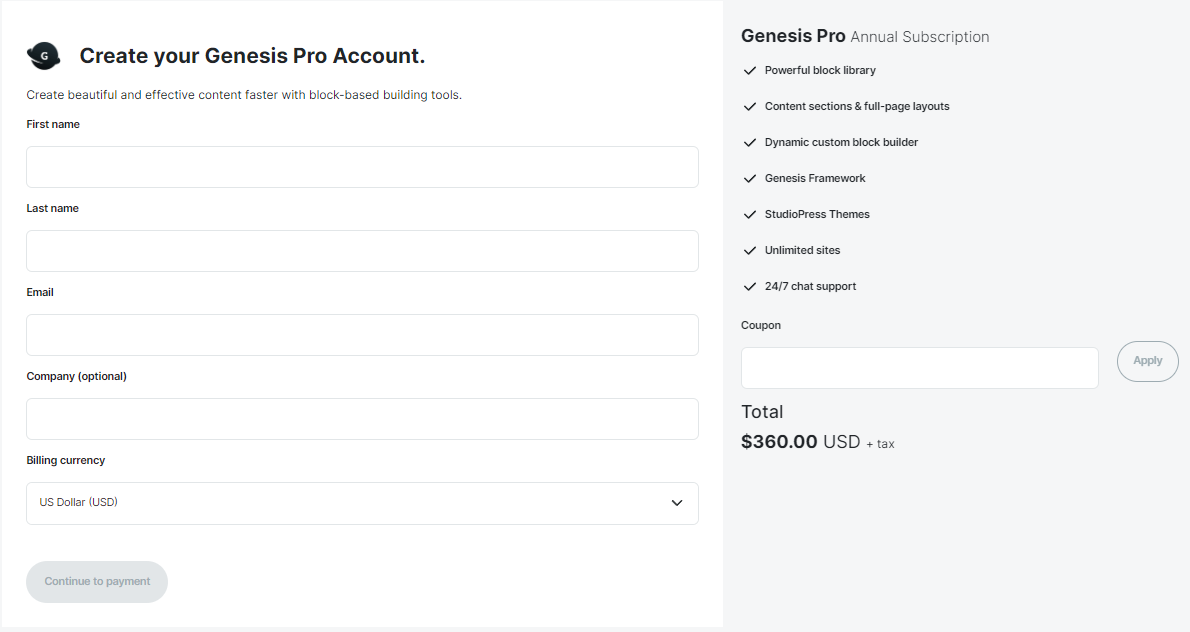
PRICE OF GENESIS PRO
Elementor: Overview
Elementor has revolutionized the landscape of WordPress website development by introducing a powerful and intuitive drag-and-drop page builder. Unlike traditional frameworks, Elementor operates as a standalone plugin, allowing users to design and customize their websites visually, without delving into code. It has gained immense and big popularity for its user-friendly approach and the ability to cater to both developers and non-developers alike.
Core Features and Strengths
Drag-and-Drop Builder
The hallmark of Elementor is its drag-and-drop interface, empowering users to create intricate page layouts without any coding knowledge. The live editor enables real-time visual customization, providing an unprecedented level of flexibility. This feature makes Elementor a favorite among those who prioritize a hands-on, interactive design process.
Design Flexibility
Elementor offers a vast array of design options, allowing users to control every aspect of their website’s appearance. From typography and color schemes to spacing and widget placement, the platform provides granular control. This flexibility caters to a broad spectrum of users, including designers, marketers, and business owners seeking a customizable and visually appealing website.
Extensive Widget Library
Elementor’s strength lies in its extensive library of widgets, ranging from basic elements like text and images to advanced features such as forms, sliders, and testimonials. The availability of these widgets simplifies the addition of complex elements to a webpage, reducing reliance on additional plugins and enhancing overall website performance.
Target Audience and Use Cases
Elementor is a versatile solution suitable for a diverse audience. While it is incredibly accessible for beginners and those with limited technical expertise, it also caters to developers seeking efficiency in their workflow. Small businesses, content creators, and anyone looking for a dynamic, visually-driven website-building experience find Elementor to be an attractive choice.
Comparison: Genesis vs. Elementor
- Design and Customization
Genesis: Theme Customization Options
The Genesis Framework, known for its clean and minimalistic approach, offers theme customization through child themes. These child themes provide a foundation that can be further customized using hooks and filters. While it may require some coding knowledge, it provides a high level of control over the design.
Elementor: Drag-and-Drop Design Capabilities
In contrast, Elementor takes a more visual approach with its intuitive drag-and-drop builder. Users can design pages in real-time without touching a line of code. Elementor’s extensive library of widgets allows for a wide range of design possibilities. It caters not only to developers but also empowers users with no coding experience to create professional-looking websites.
- Performance
Genesis: Emphasis on Speed and Efficiency
Genesis is renowned for its emphasis on performance. The framework is designed to be lightweight, ensuring fast loading times for websites. With a focus on clean code and optimized architecture, Genesis is an excellent choice for those prioritizing website speed and efficiency.
Elementor: Impact on Website Performance
While Elementor’s drag-and-drop functionality enhances design flexibility, some users raise concerns about its potential impact on website performance. However, Elementor has made significant strides in optimizing its code, and with proper configuration and caching, users can maintain good performance levels.
- SEO Features
Genesis: SEO-Friendly Architecture
Genesis is built with a strong foundation for search engine optimization (SEO). Its clean code and adherence to best practices contribute to improved search engine rankings. Genesis provides a solid framework for developers to implement SEO strategies effectively.
Elementor: SEO Considerations and Capabilities
Elementor, while not inherently focused on SEO, allows users to optimize content easily. Users can add meta tags, descriptions, and customize URLs within the Elementor interface. It’s essential for users to be mindful of SEO practices when utilizing Elementor to ensure optimal search engine visibility.
- Learning Curve
Genesis: Developer-Oriented
Genesis, with its emphasis on coding and customization through hooks and filters, may have a steeper learning curve for beginners. It is well-suited for developers who are comfortable working with code and want precise control over the theme structure.
Elementor: User-Friendly for Non-Developers
Elementor, on the other hand, is designed with user-friendliness in mind. Its visual editor makes it accessible to those without coding experience, enabling them to create sophisticated designs easily. However, this user-friendly approach doesn’t compromise on the capabilities offered to experienced developers.
Use Cases and Recommendations
- Ideal Scenarios for Choosing the Genesis Framework
- Developers and designers seeking full control over the theme structure.
- Projects with a primary focus on speed, efficiency, and SEO from the ground up.
- Websites requiring a more traditional, code-centric approach to customization.
- Situations Where Elementor Excels
- Users who prioritize a visual and intuitive design process without coding.
- Projects where quick prototyping and iteration are essential.
- Those who want a wide range of design options without delving into code intricacies.
- Considerations for Mixed-Use (Combining Genesis and Elementor)
- Combining Genesis and Elementor allows users to leverage the strengths of both frameworks.
- Use Genesis for the robust foundation and SEO benefits, while Elementor enhances design flexibility.
- Ideal for projects where a balance between code-level customization and visual design is desired.
Conclusion
In the dynamic landscape of website development, choosing the right and fitted framework is pivotal to the success of any online venture. The comparison between the Genesis Framework and Elementor has illuminated distinct strengths and considerations for developers, designers, and website owners.
In the realm of Design and Customization, Genesis stands out for its meticulous control through child themes and coding prowess. On the other hand, Elementor’s drag-and-drop capabilities empower users of all levels to create stunning designs effortlessly.
When it comes to Performance, Genesis takes the lead with its commitment to speed and efficiency. However, Elementor, with its visual builder, has made significant strides in balancing design flexibility without compromising overall website speed.
The SEO Features of both frameworks showcase different approaches. Genesis, with its SEO-friendly architecture, caters to developers looking to implement precise SEO strategies. Elementor, while not an SEO-centric tool, provides users with the flexibility to optimize content for search engines.
Considering the Learning Curve, Genesis is a natural fit for developers comfortable with coding intricacies. Elementor, with its user-friendly interface, opens the door for those without coding experience to actively participate in the design process.
Best Free Genesis Themes for Your Website
Introduction
In the ever-evolving landscape of website development, the Genesis framework has emerged as a stalwart foundation, providing WordPress users with a robust and versatile platform to build upon. As online presence becomes increasingly vital, the need for websites that not only captivate audiences but also excel in performance and functionality has never been more pronounced. It is within this dynamic digital terrain that the relevance of Genesis themes takes center stage.
Genesis themes, designed specifically to complement the Genesis framework, offer a distinctive blend of aesthetic appeal and technological prowess. They embody the marriage of sleek design with underlying code efficiency, a synergy that sets them apart in the realm of WordPress theme development. What’s even more compelling is the accessibility of free Genesis themes, an option that opens the doors to a world of possibilities without straining the budget.
Understanding Genesis Themes
Genesis themes are intricately tied to the robust framework they’re built upon. The Genesis framework, renowned for its clean code and optimal performance, serves as the backbone for these themes. Designed with a focus on simplicity and functionality, Genesis themes seamlessly integrate with the framework, ensuring a stable and reliable foundation for your WordPress website.
The inherent structure of Genesis themes contributes significantly to their appeal. These themes adhere to industry best practices, enhancing the overall user experience and making them an ideal choice for both beginners and experienced developers. Their adherence to coding standards not only facilitates smooth website operation but also ensures easy customization for those with a penchant for design modifications.
Moreover, the SEO optimization capabilities of Genesis themes set them apart. Search engine algorithms favor well-structured websites, and Genesis themes, by default, exhibit this characteristic. This feature not only saves time but also gives website owners a competitive edge in the digital landscape.
The Appeal of Free Themes
In an era where digital presence is paramount, businesses and individuals are increasingly seeking cost-effective solutions for website development. Free Genesis themes emerge as a compelling option, offering the sophistication of premium designs without the associated price tag.
Beyond the obvious financial advantage, these themes provide a gateway for users to explore the capabilities of the Genesis framework. Users can familiarize themselves with the framework’s structure, functionality, and customization options at no cost. This hands-on experience often proves invaluable, especially for those new to WordPress development.
Furthermore, the availability of free Genesis themes contributes to the democratization of web design. It enables smaller businesses, startups, and individuals to access professional-grade themes that might otherwise be financially out of reach. This democratization fosters diversity in the digital landscape, with a myriad of websites reflecting various industries, interests, and creative pursuits.
Top Picks: Free Genesis Themes
When it comes to free Genesis themes, there’s a wealth of options that combine aesthetic appeal with robust functionality. Here are some top picks that stand out in the realm of free Genesis themes:
Astra Genesis
- Description: Astra Genesis offers a clean and minimalist design, making it versatile for various website types. Its responsive layout ensures a seamless user experience across devices.
- Key Features:
- Customization options for colors, fonts, and layout.
- SEO-friendly structure for improved search engine visibility.
-
- Compatibility with popular page builders for enhanced design flexibility.
- Ideal Use Cases: Astra Genesis is suitable for bloggers, small businesses, and portfolio websites.
Mai Lifestyle
- Description: Mai Lifestyle boasts a modern and visually appealing design, making it an excellent choice for content-rich websites. Its flexible customization options cater to different niches.
- Key Features:
- Multiple layout options to showcase content in a dynamic manner.
- Built-in WooCommerce support for those looking to create an online store.
-
- Fast-loading design for an optimal user experience.
- Ideal Use Cases: Mai Lifestyle is well-suited for lifestyle bloggers, online magazines, and personal brand websites.
Essence Pro
- Description: Essence Pro offers a sophisticated and elegant design that is perfect for creating a professional online presence. Its simplicity and focus on content make it highly readable and engaging.
- Key Features:
- Strategic placement of widgets for easy customization.
- Gutenberg-ready for seamless integration with the WordPress block editor.
-
- Mobile responsiveness for a consistent look on various devices.
- Ideal Use Cases: Essence Pro is ideal for coaches, consultants, and service-oriented businesses.
Infinity Pro
- Description: Infinity Pro combines a sleek design with robust features, providing a polished look for business and portfolio websites. Its versatility and customization options make it a standout choice.
- Key Features:
- Full-width image sections for impactful visual storytelling.
- Customizable header options for brand consistency.
-
- eNews Extended plugin integration for newsletter subscriptions.
- Ideal Use Cases: Infinity Pro suits creative agencies, freelancers, and photographers.
Mai Reach
- Description: Mai Reach is designed for those who prioritize functionality and user engagement. Its modern layout and customizable features make it a solid option for various purposes.
- Key Features:
- Integration with popular plugins for added features.
- Customizable color schemes and typography options.
-
- Accessibility-ready for an inclusive user experience.
- Ideal Use Cases: Mai Reach is a great fit for nonprofits, educational institutions, and community-focused websites.
Installation and Customization
In the world of web development, the process of integrating a Genesis theme into your WordPress website is both seamless and empowering. Here, we delve into the step-by-step journey of installing and customizing these free Genesis themes, ensuring that your website not only looks impressive but also functions seamlessly.
- Installing Your Chosen Genesis Theme
Accessing the WordPress Dashboard:
- Log in to your WordPress dashboard.
- Navigate to the “Appearance” tab on the left-hand side.
Accessing the Themes Section:
- Click on “Themes” to enter the themes management section.
Uploading the Theme:
- Select the “Add New” button.
- Click on the “Upload Theme” option.
- Choose the downloaded Genesis theme file from your computer.
- Click “Install Now.”
Activating the Theme:
- Once installed, activate the theme to make it live on your website.
Configuring Theme Settings:
- Some Genesis themes come with specific settings that can be configured. Navigate to the theme’s settings and customize options such as color schemes, typography, and layout.
- Customizing Your Genesis Theme
Customizer Tool:
- Use the WordPress Customizer tool for real-time visual changes.
- Access it through the “Customize” option in the “Appearance” menu.
Header and Footer Customization:
- Modify the header and footer sections to align with your brand identity.
- Adjust logo placement, header text, and footer widgets as needed.
Typography and Color Palette:
- Tailor the typography to enhance readability.
- Adjust the color palette to match your brand’s aesthetics.
Homepage Settings:
- Depending on the theme, customize the homepage layout.
- Configure the number of columns, featured content, or slider settings.
Widget Areas:
- Explore and customize widget areas to add functionality.
- Widgets can include recent posts, popular categories, or social media feeds.
Responsive Design:
- Ensure your theme is responsive across various devices.
- Use the customization options to preview and adjust the appearance for desktops, tablets, and smartphones.
- Best Practices for Customization
Backup Your Website:
- Before making significant changes, create a backup to prevent data loss.
Regularly Update:
- Keep both the Genesis framework and your theme up to date for optimal performance and security.
Utilize Child Themes:
- For advanced customization, consider using child themes to avoid losing modifications during theme updates.
By following these steps and best practices, you’ll not only successfully install and activate your chosen free Genesis theme but also have the tools to customize it to suit the unique personality and functionality of your website. The flexibility offered by Genesis themes, even in their free iterations, empowers users to create a web presence that is both visually stunning and highly functional.
Common Misconceptions
In the dynamic landscape of WordPress development, misconceptions often swirl around the use of free themes, and Genesis themes are no exception. Dispelling these myths is crucial for users to make informed decisions about their website development. Let’s address some of the most common misconceptions:
Limited Functionality and Customization:
- Misconception: Free Genesis themes are believed to offer limited functionality and customization options compared to their premium counterparts.
- Reality: While premium themes may provide additional features, free Genesis themes are crafted with versatility in mind. Users can customize these themes extensively, adjusting layouts, colors, and functionalities to suit their unique needs.
Subpar Quality and Support:
- Misconception: Free themes are often assumed to lack the quality and support associated with premium options.
- Reality: Many developers contribute to the Genesis framework, fostering a supportive community. Free Genesis themes, though not directly backed by premium support, often benefit from community forums and extensive documentation, providing users with ample resources to troubleshoot and enhance their websites.
Security Concerns:
- Misconception: There’s a perception that free themes compromise website security.
- Reality: Genesis themes, whether free or premium, prioritize security. The framework itself undergoes regular updates to address vulnerabilities, and free themes within the Genesis ecosystem are no exception. Users can confidently utilize free themes without sacrificing the security of their websites.
One-Size-Fits-All Approach:
- Misconception: Some users may believe that free Genesis themes offer a generic, one-size-fits-all design.
- Reality: Free themes within the Genesis framework are diverse and adaptable. They cater to various industries and styles, allowing users to find a theme that aligns seamlessly with their specific brand identity and content.
Incompatibility Issues:
- Misconception: Concerns exist about free Genesis themes being incompatible with certain plugins or WordPress updates.
- Reality: The Genesis framework, including its free themes, is designed to maintain compatibility with the latest WordPress versions. While occasional updates may be necessary for some themes, the development community actively addresses compatibility issues, ensuring a smooth user experience.
Best Practices for Theme Selection
When it comes to selecting a Genesis theme for your WordPress website, thoughtful consideration is key. The vast array of available themes can be overwhelming, but adhering to best practices ensures you make an informed decision that aligns with your website’s goals and requirements.
Responsiveness:
- In the era of diverse devices and screen sizes, opting for a responsive theme is non-negotiable. A responsive design ensures that your website looks and functions seamlessly on desktops, tablets, and smartphones. This enhances the user experience and positively influences search engine rankings.
SEO-Friendliness:
- A well-optimized website is more likely to attract organic traffic. Genesis themes are renowned for their built-in SEO features. When selecting a theme, prioritize those that support SEO best practices, including clean code, fast loading times, and easy integration with popular SEO plugins.
Support and Documentation:
- Evaluate the level of support and documentation provided with the theme. A reputable theme developer will offer comprehensive documentation that guides you through installation, customization, and troubleshooting. Additionally, consider themes with active community forums where users can seek advice and share experiences.
Customization Options:
- Look for themes that strike a balance between flexibility and simplicity. The ability to customize colors, fonts, layouts, and other elements is crucial for tailoring the theme to your brand identity. However, an overwhelming array of options can be counterproductive, so choose a theme with intuitive customization features.
Speed and Performance:
- Page loading speed is a critical factor influencing user satisfaction and search engine rankings. Opt for themes that prioritize performance optimization. Efficient coding, minimal use of external resources, and compatibility with caching plugins contribute to a faster and smoother user experience.
Security Considerations:
- Security should always be a top priority. Genesis themes, known for their adherence to coding standards, contribute to a secure website environment. Ensure that the theme receives regular updates and is compatible with the latest WordPress version to patch any potential security vulnerabilities.
Cross-Browser Compatibility:
- Your website should function consistently across various web browsers, including Chrome, Firefox, Safari, and Edge. Choose a Genesis theme that is tested and optimized for cross-browser compatibility to ensure a uniform user experience regardless of the browser used.
Demo and User Reviews:
- Before committing to a theme, explore its demo to get a firsthand look at its design and functionality. Additionally, read user reviews to understand the experiences of others who have used the theme. This can provide valuable insights into any potential issues or limitations.
In conclusion, the world of free Genesis themes unveils a treasure trove of possibilities for website owners seeking both elegance and functionality. With a commitment to the best practices outlined, you pave the way for a website that not only stands out visually but also performs optimally in the competitive online sphere. Embrace the freedom of choice, armed with the knowledge of what makes a Genesis theme not just good but perfect for your digital venture. May your website flourish, adorned by the sophistication and efficiency that a well-chosen Genesis theme can bring.
Astra vs Elementor: Choosing the Right Tools for Your Website
Introduction
As the digital realm becomes increasingly competitive, website owners, bloggers, and businesses are faced with the crucial decision of selecting tools that not only align with their design preferences but also contribute to the overall functionality and performance of their websites.
Enter Astra and Elementor, two prominent players in the WordPress ecosystem that have garnered widespread acclaim for their distinct yet complementary roles. Astra stands as a versatile and lightweight WordPress theme, known for its efficiency and flexibility. On the other hand, Elementor emerges as a powerhouse page builder, empowering users with an intuitive drag-and-drop interface to craft visually stunning pages without the need for intricate coding.
As the online realm continues to evolve, the synergy between a robust theme and a powerful page builder becomes the cornerstone of a successful digital presence. Whether you’re a seasoned developer or a novice venturing into the world of WordPress, understanding the nuances of these tools is paramount for creating a website that not only captures attention but also delivers a seamless and enjoyable user experience. Let’s embark on this exploration, dissecting the features and capabilities of Astra and Elementor to help you navigate the intricate landscape of website building with confidence and precision.
Astra: Unveiling the Versatile WordPress Theme
Overview of Astra’s Features and Capabilities
Astra stands out as a versatile and powerful WordPress theme, offering a robust set of features that cater to a wide range of website needs. Key features include:
Lightweight and Fast Performance: Astra is renowned for its exceptional speed and efficiency. With minimal coding and a focus on performance optimization, websites built with Astra load quickly, contributing to a positive good user experience and search engine rankings.
SEO-Friendly Design: Astra is designed with search engine optimization (SEO) in mind. Its clean and well-structured code, combined with compatibility with popular SEO plugins, ensures that websites built on Astra have a solid foundation for achieving higher search engine rankings.
Emphasis on Astra’s Lightweight and Fast Performance
Efficient Codebase: Astra’s codebase is minimal and well-optimized, contributing to faster page loading times. This is especially crucial for user retention and SEO, as website speed is a significant factor in search engine algorithms.
Reduced Server Requests: Astra’s design minimizes the number of server requests, reducing the load on web servers. This not only enhances website speed but also contributes to better scalability, making Astra suitable for a variety of projects, from small blogs to large e-commerce sites.
Discussion on Astra’s Customization Options and Pre-built Templates
Flexible Customization: Astra provides users with a high degree of customization flexibility. Through the WordPress Customizer, users can easily personalize various aspects of their website, including layout, colors, typography, and more, without the need for extensive coding knowledge.
Pre-built Starter Templates: Astra offers a rich library of pre-built starter templates that serve as excellent starting points for different types of websites. Whether creating a business site, portfolio, or online store, users can choose and pick from a variety of professionally and detailed designed templates and customize them to suit their specific needs.
Examples of Websites that Excel with Astra
To illustrate Astra’s versatility and effectiveness, let’s explore a few examples of websites that have successfully leveraged Astra:
Business Websites: Astra is a popular choice for businesses of all sizes.
Blogs and Content Platforms: Content creators appreciate Astra’s focus on readability and its ability to showcase content in an engaging manner. The theme’s compatibility with various content types makes it ideal for bloggers, journalists, and online publications.
E-commerce Stores: Astra seamlessly integrates with popular e-commerce plugins, providing a solid foundation for online stores. Its performance optimization ensures a smooth shopping experience for visitors.
Elementor: Empowering Web Design with a Drag-and-Drop Builder
Elementor stands out as a dynamic and feature-rich page builder plugin, offering an empowering solution for web designers and developers looking to create visually stunning and highly functional websites.
Introduction to Elementor’s Power and Versatility
Elementor’s core strength lies in its intuitive drag-and-drop builder, allowing users to create complex page layouts without the need for extensive coding knowledge. It seamlessly integrates into WordPress, providing a seamless and efficient design experience.
Overview of Elementor’s Intuitive Drag-and-Drop Interface
Elementor’s user interface is designed with simplicity and functionality in mind. The drag-and-drop editor enables users to visually construct their pages, sections, and elements effortlessly. The live preview feature ensures real-time feedback, allowing designers to see changes instantly.
Exploration of Elementor’s Widget Library and Design Capabilities
One of Elementor’s standout features is its extensive widget library. From basic elements like font text and images to advanced elements like forms and pricing tables, Elementor provides a diverse set of tools for customization. Users can easily add and configure widgets, giving them granular control over the design and functionality of their websites.
Showcase of Websites Created Using Elementor
Elementor’s impact is best demonstrated through real-world examples. Many notable websites across diverse industries leverage Elementor to achieve their unique design goals.
E-commerce Excellence:
Elementor enables seamless integration with popular e-commerce platforms, allowing users to design captivating product pages, streamlined checkout processes, and engaging product galleries.
Portfolio Perfection:
Creatives and agencies benefit from Elementor’s ability to showcase their work with visually appealing portfolio sections. Customizable galleries and image sliders provide a canvas for expressing their unique brand identity.
Corporate Class:
For corporate websites, Elementor ensures a professional and polished look. Its design capabilities extend to creating informative landing pages, interactive contact forms, and engaging team profiles.
Elementor Pro: Unleashing Advanced Features
Elementor offers a Pro version that unlocks an additional layer of features. This includes theme building capabilities, custom post type support, and a powerful popup builder. Elementor Pro caters to users with advanced design and functionality requirements.
Head-to-Head Comparison
Performance
Speed and Efficiency:
Astra:
Astra prides itself on its lightweight design, contributing to exceptional speed and efficiency. This theme is meticulously crafted to load quickly, offering users a seamless browsing experience. Astra’s emphasis on performance makes it an excellent choice for websites that prioritize speed and responsiveness.
Elementor:
As a page builder, Elementor introduces additional resources to the website. However, the Elementor team has implemented optimizations to enhance speed. Users can leverage caching options and performance settings within Elementor to mitigate any potential impact on website speed. It’s crucial to strike a balance between feature-rich design and optimal performance when utilizing Elementor.
Resource Consumption:
Astra:
Astra’s minimalistic approach extends to its resource consumption, ensuring that it places a light load on server resources. This characteristic is particularly advantageous for websites hosted on shared servers or those with limited resources. Astra’s efficient resource management contributes to a smoother user experience and faster page loading times.
Elementor:
Due to its extensive features and drag-and-drop functionality, Elementor may consume more server resources than a lightweight theme. However, users can explore Elementor’s settings to manage and optimize resource usage. Elementor’s resource requirements should be considered when choosing the platform, especially for websites hosted on servers with specific resource limitations.
Customization
Options and Flexibility:
Astra:
Astra offers a robust set of customization options through its theme settings. Users can fine-tune various aspects of their website, including layout, color schemes, and typography. The flexibility of Astra’s customization options caters to a wide range of design preferences, from minimalist to highly stylized websites.
Elementor:
Elementor’s strength lies in its extensive library of widgets and customization possibilities. Users can take advantage of a drag-and-drop interface to arrange and design elements on their pages precisely. The level of control provided by Elementor allows for detailed customization, making it suitable for users who seek a high degree of creative freedom.
Pre-built Templates:
Astra:
Astra simplifies the design process with its collection of pre-built templates. These templates cover various industries and niches, offering users a head start in creating their websites.
Elementor:
Elementor also provides a rich library of pre-made templates that users can import and customize. These templates serve as a foundation for website design and are a valuable resource for users seeking inspiration or a quick start to their projects. Elementor’s template library complements its design capabilities, providing users with a wide array of design options.
Ease of Use
User Interface:
Astra:
Astra is known for its user-friendly interface, particularly within the WordPress customizer. The intuitive design of Astra’s interface simplifies the process of adjusting theme settings. This user-friendly approach ensures that both beginners and experienced users can navigate Astra’s customization options with ease.
Elementor:
Elementor’s drag-and-drop interface is a hallmark of its user interface. The visual editor allows users to see real-time changes as they design their pages. While this approach might have a steeper learning curve for beginners, it provides a highly interactive and dynamic design experience.
Learning Curve:
Astra:
Astra is often praised for its beginner-friendly nature. Users, even those new to website development, can quickly grasp the basics of Astra’s customization options. Astra’s documentation and educational resources further assist users in getting started with confidence.
Elementor:
Elementor’s feature-rich environment may present a steeper learning curve for beginners. However, the availability of tutorials, online documentation, and a supportive community can significantly aid users in overcoming initial challenges. Once users become familiar with Elementor’s interface, its powerful design capabilities become more accessible.
Integration
Third-party Compatibility:
Astra:
Astra boasts compatibility with various WordPress plugins and third-party tools. Its design ensures that users can seamlessly integrate additional functionalities into their websites, expanding the capabilities of their Astra-powered sites.
Elementor:
Elementor is known for its extensive compatibility with popular WordPress plugins. Users can enhance their websites by integrating additional features and functionalities alongside Elementor’s powerful design tools. The wide range of supported plugins contributes to Elementor’s versatility.
Cross-Browser Compatibility:
Astra:
Astra is committed to providing a consistent user experience across different web browsers. The theme undergoes testing to ensure compatibility with major browsers, and any features or optimizations are implemented to address potential compatibility issues.
Elementor:
Elementor shares a commitment to cross-browser compatibility, aiming to deliver a seamless experience regardless of the browser used. The Elementor team addresses and resolves any browser-specific challenges, contributing to a consistent design across various platforms.
Support and Community
Official Support Channels:
Astra:
Astra provides robust official support channels, including comprehensive documentation, forums, and direct customer support. Users can rely on these resources to find answers to common questions, troubleshoot issues, and access guidance on utilizing Astra’s features effectively.
Elementor:
Elementor offers a range of official support channels, including detailed documentation, community forums, and direct customer support. Users can leverage these resources to navigate Elementor’s features, seek assistance from the community, and receive direct support from the Elementor team when needed.
Community Engagement:
Astra:
Astra’s community forums and user groups provide spaces for users to engage with each other. These platforms foster knowledge sharing, collaboration, and the exchange of ideas. Being part of the Astra community offers users additional insights and support.
Elementor:
Elementor boasts an active and vibrant community. Users can participate in forums, groups, or community-driven events to connect with fellow designers and developers. The Elementor community serves as a valuable resource for learning, troubleshooting, and staying updated on the latest trends and techniques.
Choosing between Astra and Elementor ultimately depends on your own specific needs, preferences, and the nature of your project. Here’s a guide to help you make an informed decision:
Define Your Project Requirements:
- Website Type:
-
- Consider the type of website you’re building (blog, business, portfolio, e-commerce). Some themes and builders may excel in specific niches.
- Design Complexity:
- Assess the complexity of your design requirements. If you need intricate layouts and design elements, Elementor’s detailed customization options might be beneficial.
Performance Considerations:
- Speed Priority:
-
- If speed is a top priority and you’re looking for a lightweight theme, Astra’s reputation for speed and efficiency may be a decisive factor.
- Evaluate the impact of Elementor on performance and consider optimizations available within the builder.
Customization Needs:
- Design Flexibility:
-
- If you prioritize design flexibility and want a detailed, drag-and-drop interface, Elementor’s extensive library of widgets and customization options may be a better fit.
- Astra provides solid customization options, especially for those who prefer a theme-based approach without the complexity of a full-fledged page builder.
Ease of Use:
- User-Friendliness:
-
- Consider your comfort level with the user interface. Astra is known for its simplicity, making it beginner-friendly.
- Elementor, while powerful, might have a steeper learning curve initially, but it offers a highly interactive design experience.
Templates and Starter Sites:
- Pre-built Templates:
-
- Evaluate the pre-built templates offered by both Astra and Elementor. Choose the one that aligns with your vision and reduces development time.
- Astra’s templates might be more theme-focused, while Elementor’s templates are designed within the builder.
Integration Requirements:
- Third-Party Plugins:
-
- Check the compatibility of Astra and Elementor with the plugins you plan to use. Both are likely to support a wide range, but it’s essential to ensure they integrate seamlessly.
- If you have specific plugins in mind, verify their compatibility with both tools.
Support and Community:
- Official Support:
-
- Examine the official support channels provided by Astra and Elementor. Look for comprehensive documentation, forums, and customer support.
- Community Engagement:
- Consider the value of community engagement. Both Astra and Elementor have active communities. If community-driven support is essential, explore forums and groups associated with each.
Budget Considerations:
- Free vs. Pro Versions:
-
- Astra and Elementor offer free versions with additional features in their pro versions.
Trial and Testing:
- Test Environments:
-
- If possible, set up a test environment and experiment with both Astra and Elementor.
- Utilize free versions or trial periods to assess how each tool aligns with your workflow and requirements.
Scalability:
- Future Growth:
-
- Consider your website’s potential for growth. Evaluate how well Astra and Elementor can scale as your website expands and your design needs evolve.
Feedback and Reviews:
- User Reviews:
-
- Explore user reviews and testimonials for both Astra and Elementor. Pay attention to feedback from users with similar project requirements and objectives.
Conclusion:
In the end, there’s no one-size-fits-all answer. Astra is an excellent choice for those who prioritize performance and a lightweight theme, while Elementor excels in providing a dynamic, drag-and-drop design experience. Carefully weigh the factors mentioned above, and consider your specific project requirements to make a well-informed decision. It may also be beneficial to start with one and transition to the other as your project evolves, given the compatibility of both tools with WordPress.
Harnessing the Power of Magic Members for Your Website
Introduction
In the dynamic landscape of online content and services, the concept of membership systems has become integral for websites seeking to foster a sense of community, offer exclusive content, and streamline user interactions. Among the array of tools available, one stands out for its seamless integration and robust feature set – Magic Members.
Magic Members is a powerful and versatile membership plugin designed to transform ordinary websites into thriving online communities. At its core, it serves as a gateway to an enhanced digital experience, allowing website owners to control access to specific content, offer premium services, and build a loyal user base. The intricacies of Magic Members go beyond a mere access control mechanism; it’s a comprehensive solution that empowers website administrators and delights end-users.
As we delve into the nuances of Magic Members, we’ll explore its key features, delve into the process of setting up and configuring the plugin, and discuss the myriad benefits it brings to both website owners and their audience. Whether you’re a seasoned webmaster looking to optimize user engagement or a newcomer seeking a reliable membership solution, understanding the capabilities of Magic Members is essential in navigating the ever-evolving landscape of online content delivery.
Key Features of Magic Members
Magic Members boasts a comprehensive array of features that set it apart as a premier membership plugin. At the forefront is its user-friendly interface, simplifying the often complex task of managing memberships. The plugin seamlessly integrates with various content types, offering website owners the flexibility to restrict access to pages, posts, and even custom content with just a few clicks.
One of the standout features is the ability to create diverse membership levels, each with its own set of privileges. This tiered approach allows website administrators to cater to different user needs, whether it’s providing basic access to free content or unlocking premium services for subscribed members. Magic Members facilitates a personalized user experience, ensuring that members feel valued and engaged.
Furthermore, the plugin supports various payment gateways, ensuring a secure and hassle-free transaction process. Whether it’s integrating with PayPal, Stripe, or other popular payment systems, Magic Members provides a robust foundation for monetizing content while maintaining the utmost security for financial transactions.
Setting Up Magic Members
Setting up Magic Members is a straightforward process designed to empower website owners with control over their content and membership structure. Below is a step-by-step guide to navigating the initial setup:
- Installation and Activation:
- Begin by acquiring the Magic Members plugin and installing it on your WordPress site. This can be done through the WordPress dashboard by navigating to the “Plugins” section and selecting “Add New.” Upload the plugin file, activate it, and you’re ready to embark on the setup journey.
- Configuration Wizard:
- Upon activation, Magic Members initiates a configuration wizard. This wizard serves as a guiding hand, leading you through essential settings for your membership site. It covers fundamental aspects such as choosing membership levels, defining access rules, and configuring payment gateways.
- Membership Levels:
- Magic Members excels in flexibility, allowing you to create distinct membership levels tailored to your content structure. Define different access levels for various types of content, whether it’s free, premium, or anything in between. This granularity ensures that your members receive precisely what they’ve subscribed for.
- Access Rules:
- The heart of Magic Members lies in its ability to control access to your content. Define access rules effortlessly, specifying which membership levels can view specific pages, posts, or custom content. This intuitive process ensures that your content is distributed strategically, fostering a sense of exclusivity for your members.
- Payment Gateway Integration:
- Monetize your content seamlessly by integrating Magic Members with popular good payment gateways such as PayPal, Stripe, or other preferred methods. The plugin supports a variety of payment options, ensuring a secure and efficient transaction process for both website owners and members.
- Customization Options:
- Tailor the look and feel of your membership portal to align with your brand. Magic Members offers a range of customization options, allowing you to create personalized registration forms, design member profiles, and even configure automated email notifications. This ensures a cohesive and branded user experience.
- Testing and Optimization:
- Before launching your membership site, take advantage of Magic Members’ testing capabilities. Verify that access rules are correctly configured, payment gateways function smoothly, and the overall user experience aligns with your vision. Optimize settings based on testing results to create a seamless and user-friendly environment.
- Ongoing Management:
- Magic Members doesn’t stop at setup – it empowers ongoing management. Regularly review analytics and reports to understand user behavior. Make adjustments to your membership structure based on insights, keeping your content and offerings dynamic and responsive to member needs.
Membership Levels and Tiers
One of the distinguishing features of Magic Members lies in its ability to accommodate diverse membership structures through the implementation of levels and tiers. Understanding the nuanced needs of both website administrators and end-users, Magic Members allows for the creation of multiple membership levels. This flexibility enables website owners to tailor their offerings to different user segments, providing varying degrees of access, benefits, and privileges based on membership tier.
These levels could range from basic free memberships, offering limited access to content, to premium tiers that unlock a plethora of exclusive features. Magic Members empowers administrators with the tools to set up and manage these levels seamlessly, fostering a scalable and customizable membership system. Whether it’s a tiered approach based on content accessibility or a subscription-based model with different pricing structures, Magic Members ensures that website owners have the autonomy to craft membership plans that align with their unique goals.
Security and Privacy Features
In the digital realm where data security and user privacy are paramount, Magic Members stands as a bastion of protection. A robust membership system is not only about providing access but also safeguarding sensitive user information and financial transactions. Magic Members integrates seamlessly with secure payment gateways, ensuring that the process of upgrading or renewing memberships is not only convenient but also safeguarded by industry-standard encryption and security protocols.
Moreover, Magic Members prioritizes the protection of user data, implementing measures to prevent unauthorized access and potential breaches. Privacy is a cornerstone of its design, with features that allow administrators to define and enforce stringent privacy policies. By instilling confidence in users that their personal information is handled with the utmost care, Magic Members contributes to the establishment of a trustworthy online community.
As websites increasingly become targets for cyber threats, the security and privacy features of Magic Members provide not only peace of mind for administrators but also a secure environment for members to engage with exclusive content and services without concerns about the safety of their data. In an era where trust is a currency, Magic Members proves to be a valuable asset for websites committed to maintaining the highest standards of security and privacy.
Integration with Other Platforms
In the ever-expanding digital ecosystem, compatibility and integration capabilities are paramount. Magic Members, cognizant of the diverse technological landscape, seamlessly integrates and evolves with popular Content Management Systems (CMS) such as WordPress, Joomla, and Drupal. This ensures that regardless of your website’s underlying framework, incorporating Magic Members is a straightforward process. The plugin’s adaptability extends beyond CMS, fostering compatibility with various e-commerce platforms and third-party tools. This interoperability not only simplifies the integration process but also enhances the overall functionality of websites, creating a cohesive and unified user experience.
Furthermore, Magic Members facilitates third-party integrations, allowing website owners to augment their platforms with additional features. From email marketing tools to analytics services, the plugin’s compatibility with external applications provides a customizable approach tailored and seamed to the unique needs of each website. This emphasis on integration not only enhances the versatility of Magic Members but also positions it as a strategic asset for websites aiming to stay ahead in an ever-evolving digital landscape.
User Management and Analytics
Effectively managing members and understanding user behavior are pivotal aspects of any successful membership website. Magic Members equips website administrators with a suite of tools for streamlined user management. From easy member registration and profile customization to flexible subscription management, the plugin empowers administrators to maintain control over the user experience.
Analytics and reporting features further elevate the user management capabilities of Magic Members. Through insightful data metrics, administrators gain valuable insights into member engagement, content popularity, and subscription trends. This data-driven approach enables informed decision-making, helping website owners refine their content strategy and optimize membership plans. Magic Members, therefore, transcends the role of a mere access control tool, evolving into a comprehensive solution that not only manages users effectively but also harnesses data for continuous improvement and strategic growth.
Best Practices for Utilizing Magic Members
Utilizing Magic Members effectively requires a strategic approach to enhance user engagement and maximize the benefits of the membership system. Here are some best practices:
- Segmentation and Personalization: Tailor membership offerings based on user preferences and behavior. Utilize Magic Members’ segmentation features to provide personalized content and experiences for different membership levels.
- Regular Content Updates: Keep members engaged by consistently updating and adding new content. Magic Members supports content drip functionality, allowing you to schedule the release of content over time, keeping members excited and committed to their subscription.
- Communication and Community Building: Foster a sense of community among members. Leverage Magic Members’ communication tools to send newsletters, updates, and exclusive offers. Encourage member interaction through forums or discussion boards integrated with the membership system.
- Incentivize Renewals and Referrals: Implement reward programs for members who renew their subscriptions or refer new members. Magic Members provides features for setting up discounts, coupons, or exclusive access as incentives, fostering loyalty and growth.
- Optimize User Onboarding: Ensure a smooth onboarding process for new members. Provide clear instructions and tutorials on accessing and utilizing membership features. Magic Members allows for customization of the onboarding experience, creating a positive first impression for new users.
Conclusion
In conclusion, Magic Members stands as a robust solution for websites aiming to implement a comprehensive membership system. The plugin’s diverse features and customizable options make it a valuable asset for website owners seeking to monetize content or build a thriving online community.
As you explore the possibilities of Magic Members, keep in mind the evolving landscape of online memberships. Regularly update your content, engage with your members, and leverage the full suite of features Magic Members offers to stay ahead of the curve.
In the dynamic world of online memberships, Magic Members not only addresses current needs but also evolves to meet future demands. Embrace the power of this plugin to transform your website into a vibrant, interactive, and profitable online space, providing value to both you as the site owner and your valued members.
Kinsta Vouchers for Exceptional Hosting
Introduction
In the ever-evolving realm of online presence, where every millisecond matters and user experience is paramount, the choice of a hosting provider can be the linchpin that determines a website’s success. Among the beacons of reliability in the hosting landscape, Kinsta shines brightly as a provider of top-tier managed WordPress hosting. In this digital era, where the digital storefront is often the first point of contact between businesses and their audience, the need for a robust and dependable hosting infrastructure cannot be overstated.
At the heart of Kinsta’s commitment to excellence lie not only their cutting-edge hosting services but also a unique opportunity for users to unlock additional value — the Kinsta Vouchers. These vouchers, akin to digital keys, open doors to a realm of cost savings and enhanced hosting features, providing a nuanced approach to optimizing one’s online presence.
Understanding Kinsta Hosting
Kinsta stands out as a premier managed WordPress hosting provider, offering a robust infrastructure designed to meet the demands of high-performance websites. With a focus on speed, security, and cutting-edge technology, Kinsta has established itself as a go-to choice for businesses, bloggers, and developers seeking a reliable hosting solution.
Key Features of Kinsta Hosting:
- Managed WordPress Hosting: Kinsta’s specialization in WordPress hosting means that its servers are finely tuned for optimal WordPress performance. This includes automatic updates, daily backups, and expert support tailored for WordPress users.
- Google Cloud Platform Integration: Kinsta leverages the power of the Google Cloud Platform, ensuring that websites hosted on their servers benefit from the same infrastructure that powers Google’s own services. This translates to high availability, scalability, and top-notch performance.
- Global Data Center Locations: Kinsta provides users with the flexibility and good choices to choose from multiple data center locations strategically positioned around the globe. This not only ensures low-latency access for visitors but also enhances the overall speed and reliability of hosted websites.
- Staging Environment: Kinsta simplifies website development and testing with a built-in staging environment. Users can make changes and upgrades to their sites without affecting the live version, facilitating seamless updates and improvements.
- Security Measures: Kinsta places a strong emphasis on security, implementing measures such as DDoS detection, hardware firewalls, and continuous monitoring to safeguard websites from potential threats.
What are Kinsta Vouchers?
Kinsta vouchers are promotional codes or discount offers provided by Kinsta to its users, allowing them to avail themselves of cost savings or additional benefits when signing up for or renewing their hosting plans. These vouchers may come in various forms, such as percentage discounts, free add-ons, or extended trial periods.
Types of Kinsta Vouchers:
- Percentage Discounts: Users can enjoy a specified percentage off their hosting fees, leading to significant cost savings over the subscription period.
- Free Add-ons or Upgrades: Some vouchers may include complimentary add-ons or upgrades, such as additional storage, premium features, or enhanced support options.
- Extended Trial Periods: Kinsta occasionally offers vouchers that extend the trial period for new users, allowing them to experience the hosting services before committing to a paid plan.
How to Redeem Kinsta Vouchers:
- During Sign-up: Users can typically enter the voucher code during the sign-up process when selecting their hosting plan.
- Renewal or Upgrade: Existing users can apply vouchers during the renewal or upgrade process to benefit from ongoing savings or additional perks.
- Benefits of Kinsta Vouchers
- Cost Savings:
- Discounts on Hosting Plans: Kinsta vouchers often translate into substantial discounts on their hosting plans, making premium hosting services more affordable for users.
- Percentage-based Discounts: Users may enjoy percentage-based discounts on their total bill, providing flexibility based on their specific hosting needs.
- Fixed Amount Discounts: Some vouchers may offer fixed amount discounts, ensuring savings regardless of the chosen hosting plan.
- Enhanced Features:
- Increased Resource Allocation: Certain vouchers might unlock additional resources such as bandwidth, storage, or processing power, enhancing the overall performance of hosted websites.
- Premium Add-ons: Users may gain access to premium add-ons or features that are not included in standard plans, contributing to an enriched hosting experience.
- Priority Support: Exclusive customer support benefits, like priority assistance, could be tied to the use of specific vouchers, ensuring a swift and responsive support system.
Tips for Maximizing Voucher Benefits
Timing Your Usage:
- Seasonal Promotions: Keep an eye on Kinsta’s promotional calendar, especially during peak seasons like Black Friday or New Year. During these times, Kinsta often offers special deals and enhanced voucher benefits.
- Renewal Discounts: Take advantage of voucher benefits during plan renewals. Some hosting providers, including Kinsta, may provide additional discounts or incentives for existing customers who renew their plans.
Understanding Restrictions:
- Plan Specifics: Before applying a voucher, carefully review its terms to understand if it is specific to certain hosting plans. Some vouchers may be designed for particular plans, such as Starter, Pro, or Business. Choose a plan that aligns with your website’s requirements while maximizing the voucher’s impact.
- Duration Limits: Be aware of any duration limits associated with voucher usage. Some vouchers may have restrictions on the duration of the hosting plan to which they can be applied. Consider your website’s long-term needs and choose a plan that optimizes the voucher benefits.
- Feature Limitations: Check for any feature limitations tied to voucher usage. Certain vouchers may be applicable only to the base hosting plan and not to additional features or add-ons. Understanding these limitations ensures that you make informed decisions about the features you can leverage with the voucher.
Combining Vouchers and Other Promotions:
- Stacking Discounts: Investigate whether Kinsta allows the stacking of vouchers with other ongoing promotions or discounts. If possible, combining multiple benefits can lead to significant cost savings. Explore different scenarios where stacking vouchers could provide the best overall value.
Long-Term Planning for Maximum Savings:
- Consider Annual Plans: Evaluate the benefits of opting for an annual hosting plan. In many cases, Kinsta and other hosting providers offer better voucher benefits for users who commit to longer-term plans. Assess your website’s stability and future needs to make an informed decision that maximizes savings over time.
How do I Redeem a Kinsta Voucher
Step 1: Log into Your Kinsta Account
- Visit the Kinsta website and log in to your own hosting account using your username and password. If you don’t have an account, sign up for one.
Step 2: Access Your Dashboard
- Once logged in, you’ll be directed to your Kinsta dashboard. This is the central hub where you can manage your hosting settings, websites, and account details.
Step 3: Navigate to Billing and Subscription Settings
- Look for a section labeled “Billing” or “Subscription” in your dashboard. Click on this section to access the settings related to your billing and subscription details.
Step 4: Locate the “Redeem Voucher” Option
- Within the Billing or Subscription settings, there should be an option or tab specifically for redeeming vouchers. It might be labeled as “Redeem Voucher” or something similar.
Step 5: Enter Your Voucher Code
- In the designated field, enter the voucher code you’ve obtained. Ensure accuracy to prevent any errors during the redemption process. You might find the voucher code in promotional emails, on the Kinsta website, or through partner promotions.
Step 6: Validate and Apply the Voucher
- After entering the voucher code, there should be a button or option to validate and apply the voucher. Click on this button to ensure that the code is valid and to initiate the application of the voucher benefits to your hosting plan.
Step 7: Review the Changes
- Once the voucher is applied, review the changes to your billing or subscription details. Check for any adjustments in pricing, discounts, or additional features associated with the redeemed voucher.
Step 8: Confirm the Redemption
- Confirm the redemption of the voucher. Some platforms may require an additional confirmation step to ensure that you intentionally want to apply the voucher benefits to your hosting plan.
Step 9: Verify the Updated Billing Details
- Navigate back to the billing or subscription settings to verify that the voucher benefits have been successfully applied. The updated details should reflect any changes in pricing or features associated with the redeemed voucher.
Step 10: Enjoy the Benefits
- With the voucher successfully redeemed, you can now enjoy the benefits associated with it, whether it’s a discount on your hosting plan, additional features, or other perks.
In conclusion, the world of web hosting is dynamic and competitive, and choosing the right hosting provider can significantly impact and affect the performance and success of your online presence. Kinsta has consistently proven itself as a leading managed WordPress hosting provider, offering a blend of reliability, speed, and cutting-edge features.
Throughout this guide, we’ve explored the concept of Kinsta vouchers and their role in enhancing the overall hosting experience. By delving into the benefits of these vouchers, users can unlock not only substantial cost savings but also gain access to an array of premium features that further elevate their website’s performance.
The Power of Bluehost SEO Tools for Online Success
Introduction
In the vast landscape of the optimized digital world, where online visibility is paramount, Search Engine Optimization (SEO) stands as the cornerstone of a successful online presence. As businesses and individuals strive to carve their niche in the digital sphere, the role of SEO cannot be overstated.
In this dynamic and ever-evolving digital ecosystem, having reliable tools at your disposal is crucial. This is where Bluehost, a trusted name in web hosting, steps in with a suite of SEO tools designed to empower website owners and developers. Bluehost has long been recognized for its commitment to providing robust hosting solutions, and its SEO tools are a testament to its dedication to facilitating not just hosting, but the overall success of online ventures.
Bluehost SEO tools offer a comprehensive set of great features that cater to the diverse needs of website owners, whether they are seasoned digital marketers or individuals just venturing into the online realm. These tools are not just an accessory but a strategic asset, equipping users with the means to optimize and digitalize their websites for search engines effectively.
Understanding Bluehost SEO Tools:
Overview of Bluehost’s Commitment to SEO:
Bluehost, a renowned web hosting provider, recognizes the pivotal role that Search Engine Optimization (SEO) plays in the success of online ventures. Its suite of SEO tools is designed to empower website owners with the means to enhance their online visibility, climb search engine rankings, and ultimately drive organic traffic.
Holistic Approach to SEO:
Bluehost’s SEO tools encompass a holistic approach, covering both on-page and off-page optimization. From meticulous analysis of meta tags and keyword integration to comprehensive backlink monitoring, Bluehost’s toolkit is tailored to meet the diverse needs of website owners, regardless of their level of expertise.
User-Friendly Interface:
One standout feature of Bluehost’s SEO tools is the user-friendly interface. Whether you’re a novice in the world of SEO or an experienced webmaster, the tools are crafted to be intuitive and easy to navigate. This accessibility ensures that users can efficiently harness the power of SEO without getting bogged down by technical complexities.
Key Features of Bluehost SEO Tools:
On-Page SEO Analysis:
Bluehost’s SEO toolkit includes robust features for on-page SEO analysis. Users can optimize crucial elements such as title tags, meta descriptions, and content structure. The tools provide actionable insights, suggesting improvements to ensure that each webpage is finely tuned for search engine algorithms.
Backlink Monitoring and Management:
Backlinks are vital for a strong off-page SEO strategy, and Bluehost’s tools include a comprehensive system for monitoring and managing backlinks. Users can track the quality and quantity of incoming links, identify opportunities for link building, and ensure a healthy backlink profile to enhance overall website authority.
Website Speed Optimization:
A crucial factor in SEO is website speed. Bluehost’s toolkit includes tools to optimize website speed, ensuring fast loading times. This not only contributes to a better user experience but is also a recognized factor in search engine rankings. Tools for image compression, caching, and code optimization are among the features that aid in achieving optimal website performance.
In-Depth Keyword Research:
Effective and good keyword research is at the core of any successful SEO strategy. Bluehost’s SEO tools offer a suite of functionalities for in-depth keyword research. Users can identify relevant and high-performing keywords in their niche, assess competition, and strategically integrate these keywords into their content for maximum impact.
Analytics and Reporting:
Bluehost’s SEO tools provide robust analytics and reporting features. Users can track and visualize the performance of their website, monitor keyword rankings, and gain insights into visitor behavior. This data-driven approach empowers website owners to make informed decisions, refine their SEO strategy, and adapt to the dynamic landscape of search engine algorithms.
How to Leverage Bluehost SEO Tools:
On-Page SEO Optimization:
– Title Tags: Bluehost provides a comprehensive tool for optimizing title tags, one of the critical on-page SEO elements. Users can easily customize and preview how their titles will appear in search results, ensuring they are both keyword-rich and compelling.
– Meta Descriptions: The SEO tools allow users to craft and optimize meta descriptions for each page. A well-written meta description not only improves search engine rankings but also entices users to click through to the website.
– Keyword Usage: Bluehost’s tools assist in identifying relevant keywords and seamlessly integrating them into website content. This helps in improving the website’s visibility for specific search queries.
Backlink Monitoring and Management:
– Link Analysis: Bluehost’s SEO tools offer a detailed analysis of the website’s backlink profile. Users can identify high-quality backlinks, track link-building efforts, and monitor the total health of their link profile.
– Disavow Tool: In the event of potentially harmful backlinks, Bluehost provides a disavow tool. This feature allows users to request search engines to ignore specific links, safeguarding the website from potential penalties.
– Link Building Suggestions: The tools may also provide suggestions for building new, relevant backlinks, helping users enhance their off-page SEO strategy.
Website Speed Optimization:
– Performance Analytics: Bluehost’s SEO suite includes tools for analyzing and improving website speed. Users can access performance analytics, identify bottlenecks, and receive actionable suggestions for faster loading times.
– Caching Options: Bluehost offers caching solutions that can significantly improve website speed. Users can configure caching settings to ensure that their site loads quickly for visitors, positively impacting both user experience and SEO rankings.
Keyword Research Tools:
– Comprehensive Keyword Database: Bluehost provides access to a comprehensive keyword database, helping users discover new and relevant keywords for their niche.
– Search Volume and Competition Analysis: The tools offer insights and overview into the search volume and competition level for each keyword. This data aids users in selecting the most strategic keywords for their content.
– Integration with Content Creation: Bluehost’s keyword tools seamlessly integrate with content creation, providing suggestions for incorporating keywords naturally within the content for optimal SEO.
Bluehost and WordPress Integration:
Seamless Integration:
– Pre-Installed WordPress Plugins: Bluehost offers pre-installed SEO-friendly plugins for WordPress, streamlining the integration process. Users can activate these plugins with just a few clicks, eliminating the need for manual installations.
– Compatibility with WordPress Updates: Bluehost ensures that its SEO tools remain compatible with the latest WordPress updates. Users can confidently update their WordPress installations without worrying about compatibility issues.
Advantages for WordPress Users:
– User-Friendly Interface: Bluehost’s SEO tools are designed with WordPress users in mind, featuring a user-friendly interface that aligns with the WordPress dashboard. This makes it easy for WordPress users to navigate and utilize the tools effectively.
– Automatic Updates: Bluehost’s integration ensures that WordPress users receive automatic updates for SEO tools, keeping their websites optimized without the need for manual intervention.
Staying Updated:
In the fast-evolving landscape of search engine algorithms, staying current is pivotal for maintaining and improving website rankings. Bluehost’s commitment to providing effective SEO tools is mirrored in its dedication to keeping these tools up-to-date. Here’s how Bluehost ensures users stay abreast of the latest trends and algorithm changes:
Regular Updates:
- Bluehost regularly releases updates to its SEO tools to align with changes and perks in search engine algorithms. This ensures that users benefit from the most current optimization strategies.
Algorithm Adaptation:
- Bluehost closely monitors major search engine algorithm updates, such as those from Google, and adjusts its SEO tools accordingly. This proactive approach helps users adapt their strategies to align with the latest ranking factors.
Educational Resources:
- Bluehost provides educational resources, including blog posts, webinars, and documentation, to keep users informed about changes in SEO best practices. This empowers website owners to make informed decisions about their optimization strategies.
Notification System:
- Bluehost incorporates a notification system within its SEO tools interface to alert users about important updates, new features, or changes in recommended practices. This ensures that users are promptly informed and can make necessary adjustments.
Community Forums and Support:
- Bluehost fosters a community of users where experiences and insights are shared. This collaborative environment allows users to stay informed about the latest SEO trends and strategies through peer-to-peer discussions.
Integration with Industry Updates:
- Bluehost aligns its SEO tools with broader industry updates and trends. By integrating with major SEO conferences, webinars, and industry publications, Bluehost ensures that its tools remain relevant in the ever-changing and evolving landscape of digital marketing.
Conclusion:
By choosing Bluehost for your SEO needs, you not only access powerful tools for website optimization but also ensure that your strategies evolve in harmony with the dynamic SEO environment. Staying updated with Bluehost’s SEO tools means staying ahead in the digital competition, as you leverage the latest insights and techniques to enhance your online presence.
Enhancing Website Security with SiteLock on Bluehost
Introduction
In an era where the digital landscape is evolving at an unprecedented pace, the importance of safeguarding online assets cannot be overstated. Websites, whether they belong to businesses, bloggers, or organizations, are prime targets for a myriad of cyber threats. From malicious malware attacks to sophisticated hacking attempts, the security of a website is paramount in ensuring a seamless and trustworthy online presence.
Bluehost, a leading web hosting service known for its reliability and performance, understands the critical role that security plays in maintaining the integrity of websites. As part of its commitment to providing a secure hosting environment, Bluehost offers integration with SiteLock, a comprehensive website security solution. This article aims to delve into the dynamic landscape of website security, the robust features of SiteLock, and how the combination of SiteLock and Bluehost sets a new standard for safeguarding online assets.
From ransomware attacks holding websites hostage to data breaches that compromise sensitive information, the digital realm demands a proactive approach to security. This is where SiteLock steps in, offering a multifaceted security suite designed to identify, mitigate, and prevent an array of cyber threats.
Bluehost, with its reputation as a reliable and secure hosting platform, recognizes the evolving nature of online threats. By integrating seamlessly with SiteLock, Bluehost provides its users with an additional layer of defense against cyber vulnerabilities. This collaboration aims to empower website owners with the tools needed to not only protect their digital assets but also to fortify the trust of their online audience.
The Threat Landscape
Overview of the Current Cybersecurity Landscape
The digital realm has become increasingly susceptible to a myriad of cybersecurity threats. From sophisticated hacking attempts to common malware infections, website owners face a continuous challenge in safeguarding their online assets. Cybercriminals are employing advanced techniques, exploiting vulnerabilities in websites for various malicious purposes, including data theft, financial fraud, and service disruption.
In this dynamic and evolving landscape, it is imperative for website owners to stay vigilant and proactive in their approach to security.
Common Threats Faced by Website Owners
Website owners encounter a spectrum of threats, ranging from well-known attacks like Distributed Denial of Service (DDoS) assaults to more insidious threats such as SQL injection and cross-site scripting. Phishing attempts and ransomware attacks further contribute to the complexity of the threat landscape. As technology advances, so do the tactics of cyber adversaries, necessitating a comprehensive security strategy to mitigate risks effectively.
The Need for Proactive Security Measures
Given the evolving nature of cyber threats, a reactive approach to security is no longer sufficient. Proactive measures are essential to thwart potential threats before they can exploit vulnerabilities. Website owners must adopt a multi-layered security approach that combines robust hosting services with specialized security solutions. Proactive measures include regular security audits, employee training, and the implementation of cutting-edge security tools like SiteLock.
Bluehost Hosting Platform
Brief Introduction to Bluehost
Bluehost stands as a leading web hosting provider, known for its reliability, performance, and user-friendly features. The platform’s popularity stems from its commitment to providing a secure and scalable environment for websites of all sizes.
The Significance of Choosing a Secure Hosting Provider
Selecting a hosting provider with a strong emphasis on security is paramount in safeguarding a website. Bluehost’s commitment to security includes features such as regular server monitoring, firewalls, and data backups. The partnership with SiteLock further fortifies Bluehost’s security infrastructure, offering users a comprehensive solution to combat the ever-present threat of cyber-attacks.
By understanding the threat landscape and the role of a secure hosting platform, website owners can make informed decisions to protect their online assets effectively.
Understanding SiteLock
Overview of SiteLock and its Features
SiteLock stands as a comprehensive website security solution designed to safeguard websites against a myriad of cyber threats. Its robust set of features encompasses real-time threat detection, vulnerability identification, and proactive malware removal. With a user-friendly interface, website owners can easily navigate through SiteLock’s dashboard to monitor and manage their website security.
How SiteLock Complements Bluehost’s Security Infrastructure
Bluehost, known for its reliable hosting services, integrates seamlessly with SiteLock to provide an added layer of defense. SiteLock’s capabilities align with Bluehost’s commitment to ensuring the security and stability of hosted websites.
Different SiteLock Plans and Their Respective Benefits
Basic Plan:
- Regular malware scans and removal
- Global content delivery network (CDN) for enhanced performance
- Automated vulnerability patching
Advanced Plan:
- Advanced threat detection with web application firewall (WAF)
- Database security scans
- Reputation management to protect brand image
Premium Plan:
- Priority support for quick issue resolution
- Daily database scanning and repair
- Enhanced DDoS (Distributed Denial of Service) protection
Key Features of SiteLock Security
Malware Detection and Removal
SiteLock employs advanced scanning algorithms to detect and eliminate malware in real-time. This proactive approach ensures that malicious code is swiftly identified and removed before it can cause harm to the website or its visitors.
Web Application Firewall (WAF)
The Web Application Firewall acts as a protective barrier between the website and potential threats. It filters and monitors HTTP traffic, identifying and blocking malicious activities, such as SQL injection and cross-site scripting, before they reach the website’s server.
Content Delivery Network (CDN) for Improved Performance and Security
SiteLock’s CDN not only accelerates website loading times but also provides and gives an additional layer of security by distributing content across multiple servers globally. This distributed network mitigates the impact of potential DDoS attacks and ensures a consistent user experience.
Automated Vulnerability Patching
Keeping software up to date is crucial for security. SiteLock’s automated vulnerability patching identifies and addresses potential weaknesses in the website’s software, reducing the risk of exploitation by cybercriminals.
Integration with Bluehost
Seamless Integration Process for Bluehost Users:
User-Friendly Interface:
- Bluehost users can seamlessly integrate SiteLock through a user-friendly interface within the Bluehost control panel.
- The intuitive design ensures that even users with limited technical expertise can navigate through the integration process effortlessly.
One-Click Integration:
- The integration involves a one-click process, minimizing the time and effort required from the user.
- Users can access the SiteLock dashboard directly from their Bluehost account, streamlining the management of security features in one centralized location.
Additional Tools for Clarity:
- SiteLock provides additional tools, such as tutorials or tooltips, guiding users through each step of the integration process.
- Clear and concise instructions help users understand the security features they are activating and how they contribute to the overall protection of their website.
How SiteLock Enhances the Overall Security Posture of a Bluehost-Hosted Website:
Comprehensive Threat Detection:
- SiteLock employs advanced scanning algorithms to comprehensively detect various types of threats, including malware, vulnerabilities, and suspicious activities.
- This multi-layered approach ensures that potential issues are identified before they can compromise the security of a Bluehost-hosted website.
Integration with Bluehost Security Infrastructure:
- SiteLock seamlessly integrates with Bluehost’s existing security infrastructure, providing an additional layer of defense.
- The collaboration between SiteLock and Bluehost ensures a holistic security solution, addressing a wide range of potential threats.
Real-Time Threat Intelligence:
- SiteLock continuously updates its threat intelligence database in real-time, ensuring that Bluehost users are protected against the latest and emerging security threats.
- This proactive approach helps prevent security incidents before they can exploit vulnerabilities in a website.
Best Practices for Website Owners
Regular Security Audits and Scans
Importance of Periodic Security Audits:
Conducting routine security audits is akin to giving your website a health check. It involves a thorough examination of your website’s infrastructure, identifying potential vulnerabilities, and ensuring that security measures are up to par. Regular audits are crucial for staying one step ahead of emerging threats.
Automated Security Scans with SiteLock:
SiteLock simplifies the audit process by automating security scans. Its robust scanning capabilities continuously monitor your website for any signs of malware or vulnerabilities. This automated approach not only saves time but also ensures a proactive defense against potential security risks.
Setting Up a Regular Scanning Schedule:
Website owners are encouraged to establish a regular scanning schedule to maintain a consistent security posture. Whether it’s a weekly or monthly routine, having a predefined schedule ensures that security scans are not overlooked and that any issues are promptly addressed.
Keeping Software and Plugins Up to Date
Role of Outdated Software in Security Breaches:
Outdated software and plugins are common entry points for cyber threats. In this section, we emphasize the critical role that timely updates play in closing potential security loopholes. Website owners need to understand that neglecting updates can expose their sites to unnecessary risks.
Guidance on Timely Updates for CMS Platforms and Plugins:
Providing specific guidance on keeping content management system (CMS) platforms and plugins up to date is essential. This can include step-by-step instructions or resources to help website owners navigate the update process, ensuring that they are equipped to maintain the latest security patches.
SiteLock’s Role in Identifying and Addressing Vulnerabilities:
SiteLock not only helps in identifying vulnerabilities but also provides guidance on addressing them. Explaining how SiteLock works hand-in-hand with website owners to keep their software updated adds a layer of assurance to their overall security strategy.
Educating Users and Staff about Security Best Practices
The Human Element in Cybersecurity:
Acknowledging the human element in cybersecurity, this section emphasizes that the best security systems can be compromised by human error. Educating both users and staff about the importance of security best practices becomes a vital component of a holistic security strategy.
Tips for Training on Secure Password Practices:
Offering practical tips for training staff and users on secure password practices, including the creation of strong, unique passwords and the importance of regular password updates, contributes to a more resilient defense against unauthorized access.
SiteLock’s Educational Resources:
SiteLock provides valuable educational resources that can be utilized in user and staff training programs. This might include tutorials, guides, or webinars that empower individuals with the knowledge they need to actively participate in maintaining a secure online environment.
In conclusion, safeguarding a website in today’s dynamic digital landscape is an ongoing imperative, and SiteLock’s integration with Bluehost emerges as a pivotal step towards achieving comprehensive security. With a multifaceted approach, including regular security audits, timely software updates, and user education, website owners can actively fortify their online presence. The seamless integration of SiteLock with Bluehost not only enhances the security infrastructure but also instills confidence in the resilience of the website. In this ever-evolving cybersecurity landscape, this advocates for a proactive commitment to website security and encourages website owners to prioritize the invaluable protection that SiteLock on Bluehost provides for sustained digital success.
When CSS Goes AWOL: A Quick Guide to Fixing Loading Issues
Ever had that heart-stopping moment when your website suddenly looks like it’s auditioning for a role in a retro ’90s movie because, well, the CSS decided to take an unscheduled vacation? I feel you. It’s the digital equivalent of arriving at a party in your best outfit, only to realize you left your style guide at home. Panic, confusion, maybe a bit of sweat—it’s all part of the CSS-gone-rogue experience.
We’ve all been there—staring at a screen, wondering why our carefully crafted stylesheets have decided to ghost us. It’s like a friend canceling plans at the last minute; inconvenient and, frankly, a bit rude. But fear not, fellow web wanderer. In this no-nonsense guide, we’re going to unravel the mystery of disappearing styles together.
Understanding the Culprits
- Common Causes:
Server Shenanigans: Sometimes, it’s not you; it’s the server. If your CSS file is hosted on a temperamental server, it might decide to play hide-and-seek. Check the internal and external server status and reach out to support if needed.
Path Predicaments: The classic mistake. A tiny typo in your file path, and suddenly, your styles are on a detour. Double-check those paths; it’s the difference between a well-styled page and a digital Picasso painting.
Browser Brawls: Browsers have their quirks. What looks fantastic in Chrome might decide to rebel in Firefox. It’s like having siblings with different tastes; they just can’t agree sometimes.
- Browser Quirks:
Chrome Chronicles: Chrome might be your go-to, but it can be ruthless in exposing coding sins. Use Chrome DevTools to see how your styles are really feeling about life.
Firefox Frontiers: Firefox is the cool rebel of the browser world, and it might interpret your CSS in unexpected ways. Embrace the quirks, and use Firefox DevTools to set things right.
Detective Work – How to Pinpoint the Issue
- Browser Developer Tools:
Inspect Element Magic: Right-click, inspect element—your magic wand to reveal the secrets of your webpage. Hover over elements, and let the browser spill the beans on your CSS.
Console Crackdown: The console is like the gossip column of your website. It spills errors and issues. Open it up, and let it do the talking.
Network Tab Nudges: The Network tab is your backstage pass to what’s loading and what’s not. Keep an eye out for any red flags or files taking a scenic route.
- Network Tab:
File Status: Check the status of your CSS file. Is it a 404 error? Maybe it’s just on a coffee break. Understanding the status helps you figure out if it’s a server issue or a code hiccup.
Load Times: A sluggish load time for your CSS file might be a sign of a server hiccup. Investigate the load times of different files to pinpoint the sluggish culprit.
Dependencies Drama: Ensure all the dependencies are playing nice. Sometimes, a missing file can cause a domino effect, leaving your styles hanging.
Solutions – Bringing Back the Styles
- Check File Paths: The rabbit hole of web development—file paths. It’s where the digital rubber meets the virtual road. Beyond just double-checking, consider:
- Absolute vs. Relative Paths: Understand the difference. Absolute paths start from the root directory, while relative paths start from the current directory. Choose wisely, as a misunderstanding here could lead your CSS on a wild goose chase.
- Path Traversal: Verify the hierarchy. Make sure your CSS isn’t meandering through subdirectories like a lost explorer. One small misstep, and your styles could end up where you least expect them.
- Server Issues: Sometimes, servers can be finicky friends. Beyond reaching out to support, try:
- File Permissions: Ensure your CSS file has the proper permissions. Servers can be sticklers for rules, and incorrect permissions might lead to your styles being locked away in a digital vault.
- .htaccess Checks: For those on Apache servers, the .htaccess file is the gatekeeper. A misconfiguration might be blocking your CSS from making its grand entrance.
- Browser Cache: The browser, your styles’ home away from home. Sometimes it gets a bit too cozy. Dive into:
- Hard Reloads: Instruct readers on performing a hard reload (Ctrl + Shift + R or Cmd + Shift + R). This ensures the browser fetches a fresh copy of your CSS, leaving no room for outdated styles to crash the party.
- Incognito Mode: Suggest testing in incognito mode. This eliminates cache issues altogether and lets your CSS strut its stuff without any browser baggage.
Prevention – Future-Proofing Your Styles
- Version Control: Git, the unsung hero of collaboration. Dive deeper into the Git universe:
- Branching Strategies: Discuss branching strategies. Encourage developers to create feature branches, allowing them to work on new styles without disturbing the peace of the main stylesheet. It’s like having a fitting room for your website’s wardrobe.
- Pull Requests: Emphasize the importance of pull requests. Before merging changes, a second pair of eyes can catch issues before they become full-blown fashion disasters.
- Backup Styles: The safety net every web developer needs:
- Media Queries for Safety: Advocate for responsive design with media queries. This ensures your styles gracefully adapt to different devices, even if your primary CSS is taking a break.
- Default Stylesheets: Consider default stylesheets. These are the unsung heroes waiting backstage, ready to step in if your main CSS decides to play hooky. Think of them as the understudies of web development.
Conclusion:
So there you have it—your crash course in resurrecting runaway styles. We’ve explored the wild terrains of file paths, navigated the server jungles, and even tamed the unruly browser cache. CSS glitches may be the uninvited guests of web development, but armed with a bit of know-how, you can show them the door.
The next time your CSS decides to pull a vanishing act, no need to panic. You’ve got the detective skills to track it down, the preventive measures to stop it from straying, and the backup plans to keep your website looking sharp.
Now, it’s your turn. Share your CSS conundrums, success stories, or even your favorite troubleshooting tips. We’re all in this together, navigating the labyrinth of web development with a dash of humor and a sprinkle of code. So, here’s to stylish websites and CSS that stays right where it belongs—front and center.
Genesis Astra: Behind the Wheels
Introduction
We’ve all been there – that moment when a car rolls by, catching our attention, making us wonder, and “What’s the story behind that sleek machine?” Well, if you’ve heard the whispers about the Genesis Astra, you’re not alone. It’s not just a car; it’s become a conversation starter, a topic of intrigue that has car enthusiasts and casual drivers alike scratching their heads, trying to decode its essence.
You know that feeling when a friend shows up with a confident grin and you can’t help but wonder what they’re up to? That’s the Astra – mysterious, intriguing, and leaving us all curious. So, let’s cut through the noise and get to the heart of the matter. What’s the real intent behind the wheels of the Genesis Astra?
In a world where cars are more than just modes of transportation, the Astra stands out. It’s not just about getting from point A to point B; it’s about the journey, the experience, and the unspoken language it shares with its driver. So, let’s peel back the layers, shall we? The Genesis Astra – more than metal and machinery; it’s a vibe, a statement, and we’re about to decode the intent behind the wheels.
Style That Turns Heads
Alright, let’s talk style – not just any style, but the kind that makes you do a double-take. The Genesis Astra isn’t pulling any punches in this department. It’s not just a car; it’s a rolling piece of art, and it’s got a mission – to turn heads wherever it goes.
The Exterior: A Showstopper
Imagine cruising down the street in a car that not only moves but grooves. The Astra’s exterior is more than metal and curves; it’s a carefully crafted masterpiece. From its aerodynamic silhouette that slices through the air with finesse to the eye-catching details that make you stop and stare – this car is designed to be seen.
It’s not just about getting from Point A to Point B; it’s about making an entrance, leaving an impression. The Astra understands that the road is your runway, and it’s strutting its stuff, saying, “Yeah, I’m here, and I look good doing it.”
The Interior: Where Comfort Meets Elegance
But the style game isn’t confined to the exterior. Step inside, and you’re entering a realm of comfort and elegance. The interior isn’t just a space; it’s an experience. From the carefully stitched leather seats that cradle you like a cocoon to the ambient lighting that sets the mood just right – the Astra’s interior is a sanctuary of style.
It’s not just about driving; it’s about enjoying the ride. The Astra is saying, “I get it; you deserve to be comfortable and surrounded by sophistication while navigating the twists and turns of life.”
Personal Expression on Wheels
Now, let’s talk about personal expression. The Astra isn’t just a car you drive; it’s an extension of who you are. The color options, the design elements – it’s all about letting you tell your story on the road. It’s like having a conversation without saying a word. The Astra’s intent is clear – your car is more than a possession; it’s a reflection of your style, your personality, and the statement you want to make.
Tech Game on Point
Now that we’ve marveled at the style, let’s dissect the technological marvel that is the Genesis Astra. It’s not just a car; it’s a high-tech hub on wheels, and the numbers behind its features are just as impressive. Infotainment Hub: Your Command Center
The Astra boasts an expansive touchscreen infotainment system, measuring a generous 12.3 inches. That’s not just a screen; it’s a visual experience. Navigation, entertainment, and vehicle settings are all at your fingertips, ensuring that you have a comprehensive view of your driving world.
Smart Connectivity: Stay Plugged In
In the connectivity realm, the Astra takes the lead with its advanced smartphone integration. Whether you’re an Android or Apple enthusiast, the Astra supports both, ensuring seamless connectivity with your device. It’s not just tech; it’s compatibility at its finest.
Entertainment Redefined: Your Personal Concert Hall
Picture this: a 15-speaker Lexicon premium audio system enveloping you in crystal-clear sound. That’s the Astra’s commitment to your auditory experience. Whether you’re a podcast aficionado or a music lover, this car transforms every drive into a concert on wheels.
Future-Forward Safety: Because You Deserve Peace of Mind
Let’s talk safety stats. The Astra is equipped with a suite of safety features, including forward collision-avoidance assist, smart cruise control with stop and go, and lane-keeping assist. These numbers translate into more than just features; they represent the Astra’s dedication to keeping you safe on the road.
Driver Assistance: Your Co-Pilot from the Future
Ever wished for a co-pilot? The Astra introduces the world to Smart Cruise Control with Machine Learning, an intelligent system that adapts to your driving style. This isn’t just a number; it’s the Astra saying, “I understand you, and I’m here to enhance your driving experience.”
Power to Roar
Now that we’ve explored the style and tech prowess of the Genesis Astra, it’s time to buckle up for a ride that’s not just about getting from one place to another; it’s about experiencing the thrill of the road. The Astra isn’t just a car; it’s a powerhouse, and its intent is clear – to give you the power to roar on the asphalt.
Under the Hood: Unleashing the Beast
Pop open that hood, and you’re greeted by an engineering marvel. The Astra’s heart, its engine, isn’t just a powerplant; it’s a high-performance machine. With a horsepower that can climb up to a staggering 400, this isn’t just an engine; it’s a beast ready to be unleashed. The growl when you start it up isn’t just noise; it’s the roar of power, the Astra saying, “I’m not just here to take you places; I’m here to make the journey unforgettable.”
Acceleration That Raises Your Pulse
Ever stepped on the gas pedal and felt that rush? The Astra isn’t just about speed; it’s about acceleration that sends shivers down your spine. Going from 0 to 60 in a mere 4.5 seconds, you’re not just moving; you’re launching. Feel the G-force as the Astra propels you forward. It’s saying, “I understand the need for speed, and I’m here to satisfy it.”
Handling That’s a Dance, Not a Drive
Taking a turn isn’t just about turning the wheel; it’s a dance between you and the road. The Astra’s handling isn’t just precise; it’s measured in Gs. With a lateral grip that can reach up to 0.90 G, you’re not just going around corners; you’re sticking to them like glue. It’s not just about getting around corners; it’s about making each turn an art form. The Astra is saying, “Let’s not just drive; let’s dance.”
The Thrill of the Ride: Beyond Transportation
Driving isn’t just about reaching a destination; it’s about the journey. The Astra isn’t just a car; it’s a promise of a thrilling ride. With a top speed that can soar up to 167 mph, it’s not just about moving; it’s about flying on the asphalt. It’s saying, “I’m not just a vehicle; I’m your ticket to adventure.”
Luxury, Because You Deserve It
Now that we’ve explored the style and tech prowess, let’s step into the lap of luxury with the Genesis Astra. This isn’t just a car; it’s a sanctuary on wheels, and its intent is crystal clear – to pamper you with opulence because, well, you deserve it.
Plush Interiors: Crafted for Comfort
Step inside, and you’ll be enveloped in luxury. The Astra’s seats aren’t just seats; they’re a masterpiece of comfort. Crafted with premium materials, including Nappa leather, each seat is a statement of opulence. It’s not just about sitting; it’s about sinking into a world of comfort that whispers, “You’ve earned this.”
Ambient Lighting: Setting the Mood
Luxury is all about the details, right? The Astra understands that, and its ambient lighting isn’t just functional; it’s an art form. With a spectrum of colors to choose from, you can set the mood inside your car. It’s not just illumination; it’s ambiance, turning your drive into an experience that caters to your every mood.
Thoughtful Details: Elevating the Experience
Luxury is in the details, and the Astra spares none. Open-pore wood trim, brushed metal accents – every detail is meticulously chosen to elevate your driving experience. It’s not just about driving; it’s about feeling the quality in every touch, a tactile reminder that you’re in a space where luxury isn’t an option; it’s a standard.
Advanced Climate Control: Tailored Comfort
Let’s talk climate control – but not the basic kind. The Astra’s system goes beyond just adjusting the temperature. It takes into account factors like the angle of the sun and the number of occupants to ensure that every corner of the car is a haven of comfort. It’s not just about heating or cooling; it’s about creating a microclimate that caters to your preferences.
Panoramic Sunroof: Bringing the Outside In
Luxury is also about the view, right? The Astra’s panoramic sunroof isn’t just a window; it’s a portal to the world outside. It’s about bringing the sky into your car, transforming every drive into a scenic journey. It’s not just a sunroof; it’s a window to a world of luxury.
Conclusion
In the realm of automobiles, the Genesis Astra isn’t just a car; it’s a journey, an experience, and an embodiment of intent. As we’ve navigated through its style, tech prowess, power, and luxury, it becomes evident that the Astra isn’t merely a mode of transportation; it’s a statement on wheels.
From its head-turning exterior that transforms every street into a runway to its tech game, backed by impressive numbers, the Astra is redefining what it means to be connected on the road. It’s not just a car with features; it’s a tech-savvy companion that understands the pulse of the modern driver.
When we stepped into the power-packed section, we felt the Astra’s engine roar, not just in decibels but in the adrenaline rush it delivers. It’s not about reaching a destination; it’s about the exhilarating journey, a dance between the driver and the road. The Astra isn’t just a car; it’s a thrilling experience waiting to be unleashed.
And as we luxuriated in the opulence of its interiors, we realized that the Astra isn’t content with being just a means of transport. It’s a sanctuary, a haven of comfort and elegance. Luxury isn’t an option; it’s the standard. The Astra’s intent is clear – to make every moment inside the car as memorable as the destination itself.
Changing Link Colors on Your WordPress Site
Introduction
So, you’ve set up your WordPress site, and it’s looking good. But let’s be real – we all want our corner of the internet to stand out, right? That’s where the fun of customization comes in. Today, we’re talking about a simple yet impactful tweak that can make your site truly yours: changing the color of your links.
Now, I get it – the world of web design can seem like a foreign language sometimes. But here’s the deal – you don’t need to be a tech whiz to give your site a personal touch.
Think of it like adding a dash of your favorite spice to a recipe – just enough to make it uniquely yours. And the best part? We’re keeping it simple. No need to go down a rabbit hole of complex code. We’re heading straight to the heart of it all – the “Additional CSS” option. It’s like the secret chamber where you can add your own flavor without feeling like you need a degree in computer science.
So, why bother changing link colors? Well, it’s like putting a signature on your site. It adds that extra layer of personality, that “this is me” vibe. We’re not talking about a major site overhaul here; it’s a quick and easy way to make your mark.
Ready to dive in? We’re not going to overwhelm you with technical mumbo-jumbo. Instead, we’ll guide you through the process in a language that makes sense – no tech dictionaries required. So, let’s roll up our sleeves and give those links a makeover. Your site, your style – let’s make it pop!
Getting Started in the WordPress Playground
Your WordPress journey is a bit like being handed the keys to a creative kingdom and the dashboard is where the magic unfolds. Picture it as the cockpit of your digital spaceship, where you chart your course and set the vibe for your online presence. Whether you’re a seasoned WordPress explorer or just getting started, finding your way around is a breeze.
The “Customizer” section is your front-row seat to the transformation show. It’s where you get to play designer without the need for a degree in graphic arts. Feeling the need for a fresh color palette or itching to switch up the fonts? This is where the magic happens. Navigate to your WordPress dashboard, locate the “Customizer,” and feel the excitement of personalization at your fingertips.
The Secret Chamber: Additional CSS
Alright, we’re about to open the door to the backstage of your WordPress theme – the “Additional CSS” option. Now, don’t let the term CSS scare you off. Think of it as your VIP pass to a club where you get to define the rules of engagement for your website’s appearance.
No need for a coding crash course; we’re keeping it real. The “Additional CSS” is where you get to add a touch of your own style without drowning in code. It’s like having a personal stylist for your site without needing a degree in computer science.
Just locate this option, and you’ll find yourself in a space where creativity meets simplicity. It’s the canvas where you can paint your site with your chosen colors, fonts, and styles. No need to fret about breaking anything – it’s a safe zone designed for your experimentation.
The Basics: Changing Regular Link Colors
So, you’ve decided it’s time to spruce up those regular links on your WordPress site. No need to worry; it’s as easy as picking a new paint color for your walls. Here’s a step-by-step guide:
Navigate to the “Customizer”: Head over to your WordPress dashboard and look for the “Customizer” section. Think of it as your digital design studio.
Locate “Additional CSS”: Once you’re in the “Customizer,” find the “Additional CSS” option. This is where you’re going to add a touch of your personal style without diving into the coding deep end.
Add the Basic CSS Code: In the “Additional CSS” section, input a simple code snippet to change the color of your regular links. Here’s an example:
a { color: #3498db; /* Your chosen color code */ }
The ‘a’ represents the anchor tag, which is the foundation of links. The color property allows and permits you to specify the text color.
Preview and Publish: Click the preview button to see how your links look with the new color. If you’re satisfied, hit the “Publish” button to make your changes live.
Remember, this is your artistic space, so feel free to experiment until you find the color that resonates with your vibe.
Adding a Dash of Fun: Changing Hover Colors
Now, let’s level up and make your links dance a little when someone hovers over them. It’s like adding a surprise element to your site. Here’s how:
Extend Your CSS Code: In the same “Additional CSS” section, add another code snippet to change the link color when someone hovers over it:
a:hover { color: #e74c3c; /* Your chosen hover color code */ }
The :hover pseudo-class targets the link when someone hovers over it, allowing you to define a different color for this interaction.
Preview Again: Click the preview button to witness how your links behave when the cursor hovers over them. Tweak the colors until you’re content.
Finalize and Publish: If you love the effect, hit that “Publish” button once again to officially apply your new link colors, both in their regular state and when the cursor performs a little jig over them.
Your Style, Your Site
Now that we’ve got the basics down, let’s talk about making this WordPress playground truly yours. It’s your digital canvas, and the way you tweak it should resonate with your unique vibe. No need to stick to the status quo – break free and let your creativity shine.
Experiment with Colors:
- Think of your website as a reflection of your personality. Feel free to experiment with different color schemes until you find the one that speaks to you.
- Navigate back to the “Customizer” and head to “Colors” – it’s like a palette waiting for your artistic touch.
- Pro tip: If you’re not sure where to start, look for color inspiration online or play around with color wheel tools to find complementary shades.
Play with Fonts:
- Fonts are the unsung heroes of web design. They can convey personality, elegance, or a casual vibe. Go to “Customizer” > “Typography” to explore font options.
- Test different font pairings to find a combination that suits your site’s tone. Don’t be afraid and sissy to mix and match styles for headings and body text.
Backgrounds and Images:
- Spice up your site with a custom background or header image. “Customizer” > “Background Image” is your go-to spot. Upload a photo that resonates with your brand or personality.
- Ensure your images are high-quality and reflect the tone of your site. It could be a scenic shot, an abstract pattern, or even a personalized graphic.
Widgets and Sidebars:
- Explore the “Widgets” section to add useful elements to your site. Whether it’s recent posts, social media feeds, or custom text, widgets can enhance user experience.
- Don’t forget about sidebars – they’re like the spice rack of your website. Drag and drop widgets into sidebars for a layout that suits your content.
Conclusion
In a nutshell, your WordPress site is an extension of you. It’s not just about the words on the page; it’s about the entire experience. By experimenting with colors, fonts, and additional elements, you’re turning your website into a digital masterpiece that reflects your style.
Remember, there’s no right or wrong in this creative process. It’s all about what feels right for you and your brand. So, don’t be afraid to hit that “Publish” button and proudly share your revamped site with the world. Your digital space just got a whole lot more personalized, and that’s something to celebrate. Cheers to making WordPress truly yours!